Grounding an Agent Without a Vector Database: AgentCore Managed Knowledge Base
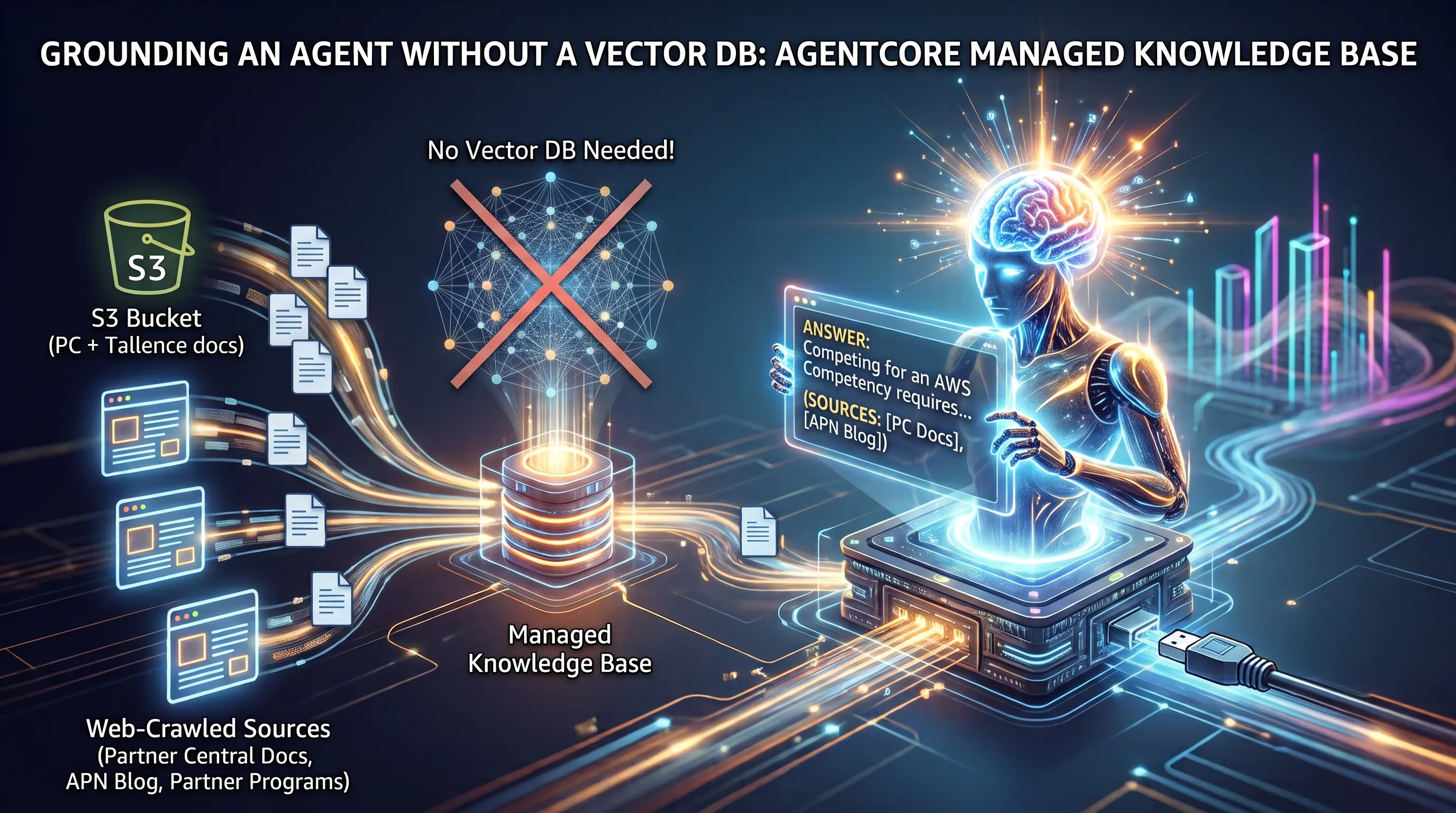
TL;DR: I grounded this agent without setting up a vector database. One Bedrock Managed Knowledge Base takes documents from a private S3 bucket and three web-crawled sources. It is passed to the model as two additional tools used through the same Gateway as all other tools. The key point is that no Terraform provider includes a resource type for a Gateway connector target. So the managed-kb target is created by a small boto3 script inside a terraform_data resource. This workaround works but loses drift detection and requires manual order specification.
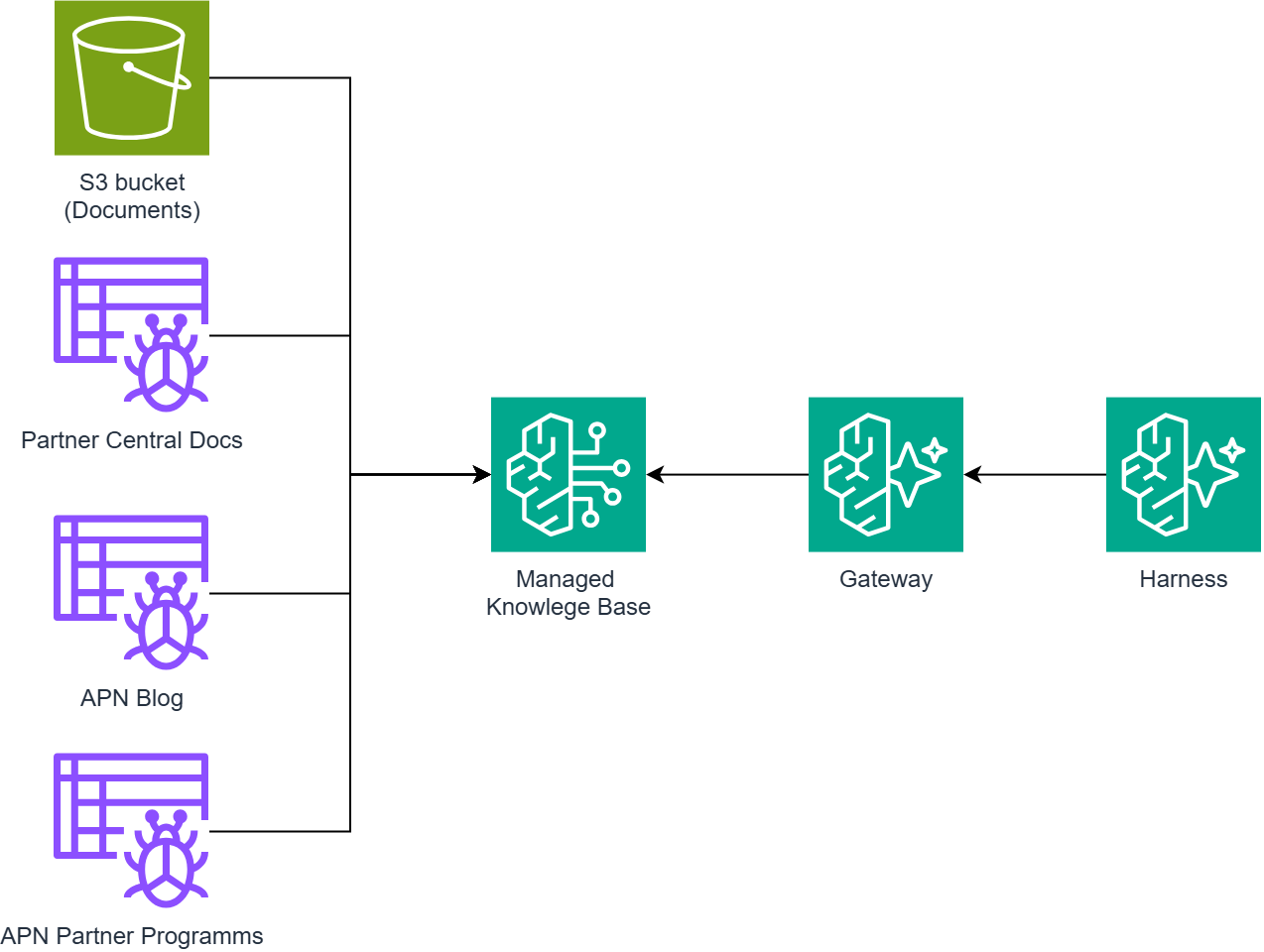
The sixth article in the "Building a Partner Sales Agent on Amazon Bedrock AgentCore" series, based on a real-world project, focuses on developing a chat-based agent that integrates HubSpot CRM with AWS Partner Central for an AWS partner's sales team. This particular article focuses on the grounding layer: it makes use of one Bedrock Managed Knowledge Base, which is fed information from an S3 bucket and three web crawler data sources, and this knowledge base is made available to the agent via the same Gateway that was introduced in article 4.
Table of Content
- Article 1: Two Systems, One Sales Motion: An AWS Partner Agent on Amazon AgentCore Harness
- Article 2: Why I Didn't Write My Own Agent Loop: The Case for AgentCore Harness
- Article 3: Configuring AgentCore Runtime: Session Lifecycle, Container Backing, Memory
- Article 4: One Gateway, Six Tools: AgentCore Gateway as Your Agent's Only Way Out
- Article 5: A Deterministic Backstop for Your Agent: AgentCore Policy and Cedar
- Article 6: Grounding an Agent Without a Vector Database: AgentCore Managed Knowledge Base
- Article 7: From Company Name to CRM Record: One AgentCore Conversation, End to End
The agent's answers didn't have to use a vector database; instead, two types of ingestion were directed at one Managed Knowledge Base.
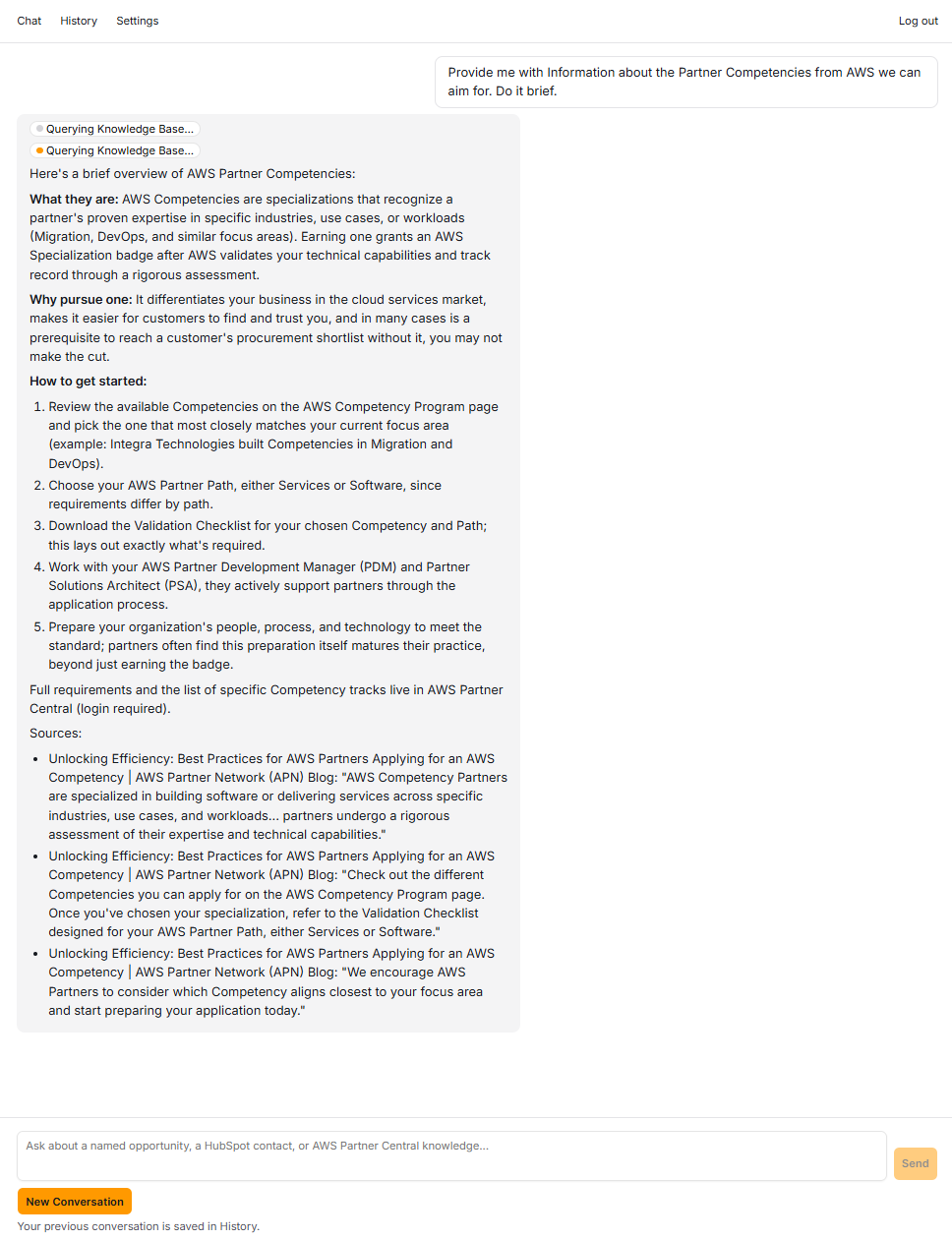
As the first article pointed out, this system has no database since HubSpot and Partner Central remain the official records. The only data the project owns is a folder of documents. This article focuses on that folder, the three public websites crawled using it, and one setup aspect no Terraform provider could represent at build time. It builds on the Gateway-target mechanism because retrieval is added as two additional tools within the same controlled environment. It also prepares for Article 7, where the live demo uses this foundation to answer competency and sales-case questions.
Why Managed, not classic KB plus a vector store?
There are two configurations of Bedrock Knowledge Bases and they require very different levels of decision-making on your part [1]. The traditional option asks you to make the following choices: an embedding model ARN, a storage backend such as an OpenSearch Serverless collection or an Aurora PostgreSQL table together with pgvector, and a chunking strategy for each data source. These choices are important when the quality of your retrieval depends on them, and merely constitute the operational interface when it doesn't. The Managed option eliminates all of these choices: you select the type of managed knowledge base, assign it a service role, and the service then provides its own embedding model, chunking, and encryption defaults [1].
In the Bedrock console, that reduces KB creation to a name and a role. One constraint hides in the role and is easy to trip over: its name must begin with AmazonBedrockExecutionRoleForKnowledgeBase_. I found that requirement buried in the resource schema's own attribute description. The role itself needs s3:GetObject and s3:ListBucket on the documents bucket so ingestion can read what you upload, and nothing else to start with.
In the automated build, the entire Knowledge Base is this:
resource "awscc_bedrock_knowledge_base" "kb" { name = "partner-growth-agent-kb" role_arn = aws_iam_role.kb_role.arn # name must start with AmazonBedrockExecutionRoleForKnowledgeBase_ knowledge_base_configuration = { type = "MANAGED" # The empty object is the complete configuration: service-managed # embedding model, chunking, and encryption defaults. managed_knowledge_base_configuration = {} }}The empty managed_knowledge_base_configuration = {} is the whole point of the design. I checked the CloudFormation resource-type schema before trusting it: ManagedKnowledgeBaseConfiguration declares no required fields at all, so {} is a valid, complete configuration rather than a lucky one. One automation footnote a console reader never sees: hashicorp/aws (6.54.0 at build time) has no managed_knowledge_base_configuration block on its knowledge base resource, a gap that was tracked upstream and has since closed (the fix merged in July 2026 for provider v6.56.0) [2], which is why every KB resource in this build uses the Cloud-Control-backed hashicorp/awscc provider instead.
The trade has limits, and a reader with different requirements should know where they sit. A Managed KB offers no tunable chunking strategy and no choice of embedding model. If you need a specific embedding model, a custom chunk size, or an index shared across knowledge bases, the classic path is the right call and this article's zero-config trade stops being available. This project's corpus, AWS Partner Central documentation plus Tallence sales-enablement material, needed none of that, so the trade went the other way. Article 1's "no independent system of record" framing already positioned the KB this way: HubSpot, Partner Central, and this KB are the only data sources the project touches, and the KB is the one that isn't a live external system.
Source one: the S3 documents bucket
The first data source is a private S3 bucket holding AWS Partner Central and Tallence sales-enablement documents that ground the demo's answers. Public access is blocked, objects are encrypted at rest with SSE-S3. Documents are uploaded directly via console.
The key operational property is that dropping a file into this bucket triggers ingestion. An S3 ObjectCreated event invokes a small ingestion Lambda that calls StartIngestionJob. There is no console button to press or sync script to run afterward. The full mechanism and its one gotcha are explained under "If you are reproducing this" below.
In the Bedrock console, attaching the bucket is a step on the Knowledge Base's data-source tab: add an S3 data source with a name, bucket, optional prefix, and bucket owner's account ID, which the console derives for same-account buckets. Attaching the same bucket via Terraform revealed a surprise unseen by console users: the connector's connection configuration requires bucketOwnerAccountId. The first apply without it passed creation but failed asynchronous validation with Member must not be null. The failure appeared later in the data source's failureReasons, a pattern repeated at larger scale in this article.
resource "awscc_bedrock_data_source" "kb_s3" { knowledge_base_id = awscc_bedrock_knowledge_base.kb.knowledge_base_id name = "s3-documents" data_source_configuration = { type = "MANAGED_KNOWLEDGE_BASE_CONNECTOR" managed_knowledge_base_connector_configuration = { connector_parameters = jsonencode({ type = "S3" version = "1" connectionConfiguration = { bucketName = aws_s3_bucket.kb_documents.bucket bucketOwnerAccountId = data.aws_caller_identity.current.account_id # required, not optional } aclEnabled = false filterConfiguration = { maxFileSizeInMegaBytes = "500" } }) } }}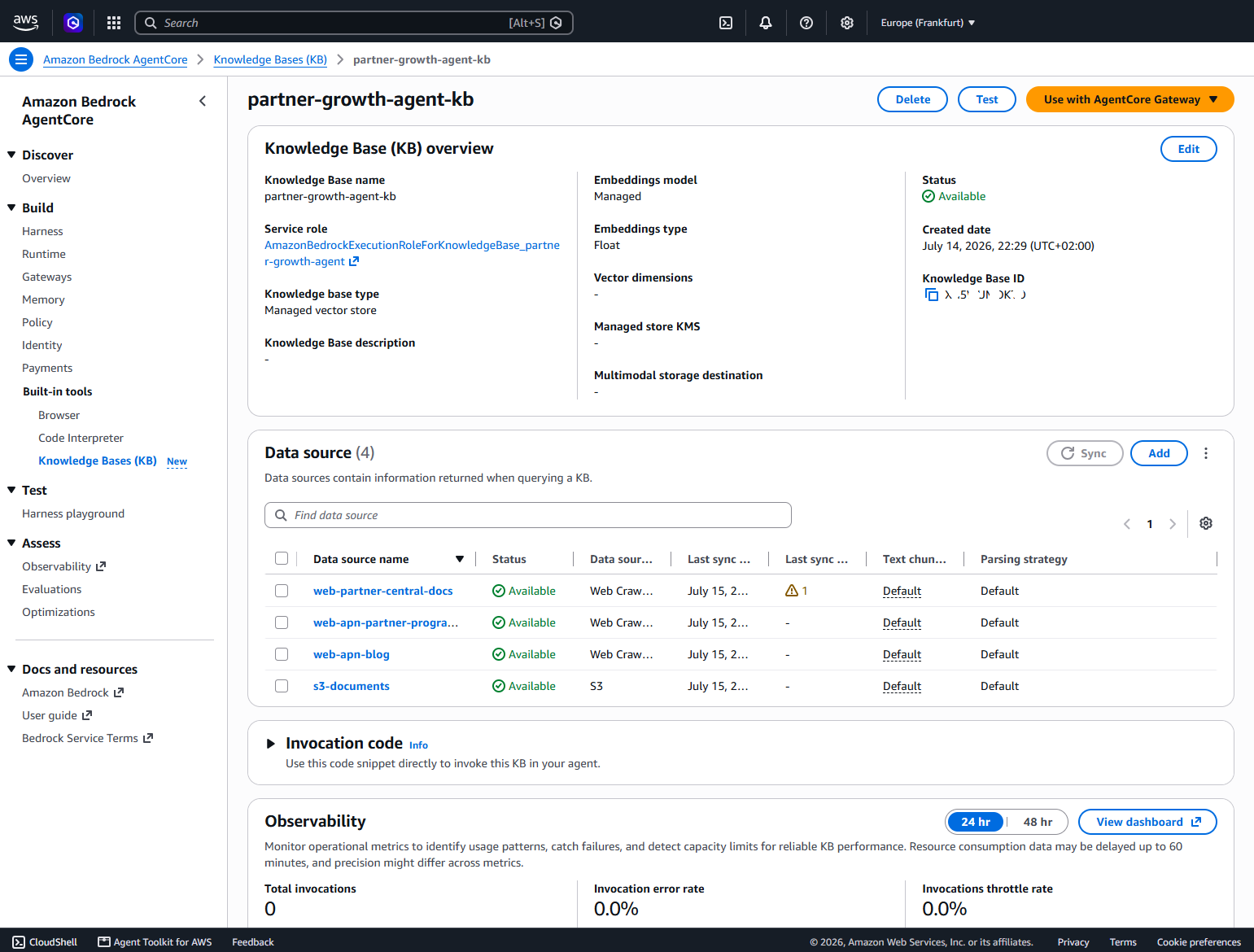
Source two: three web crawler data sources
The corpus also needed current public content: the Partner Central documentation tree at docs.aws.amazon.com/partner-central/, an APN blog post on applying for an AWS Competency, and the APN partner program pages. The requirement was a deep crawl, depth 10, restricted tightly to each seed's own URL path.
Whether that requirement is expressible depends on the type of KB created, because AWS provides two structurally distinct web crawler schemas. The classic KB's crawler has no crawl-depth field; it offers a page limit, rate limit, and a scope enum of HOST_ONLY or SUBDOMAINS [3]. The Managed KB's connector schema is richer: crawlConfiguration.crawlDepth accepts 0 to 10 with a default of 2, and syncScope = "PATH_SPECIFIC" restricts the crawl to the seed URL's host and path prefix [4]. Depth 10 was achievable exactly as requested, but only because the parent KB was Managed. On a classic KB, the design would have required compromise from the start.
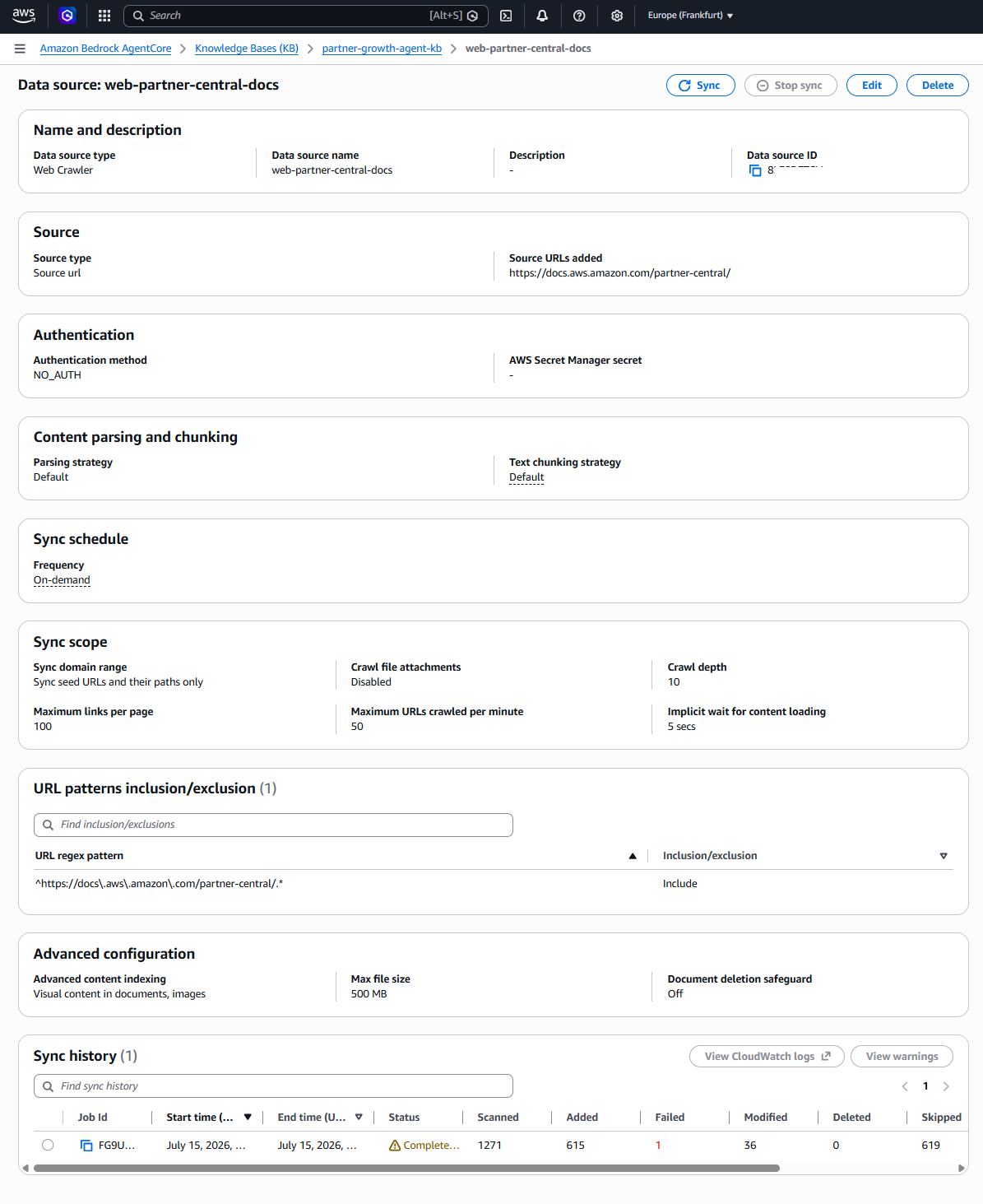
In the console, each crawler is added from that same data-source tab as a data source of the web crawler type, and the fields that follow are the ones its form asks for: a name, a seed URL, the sync scope, the crawl depth, and inclusion patterns. Per data source, the fields that matter: a seed URL, authType = "NO_AUTH" for a public site, the crawl depth, the sync scope, maxCrawledUrlsPerMinute (50 here), crawlAttachments = false, and an inclusion regex. There are three data sources rather than one with three seeds for a schema reason: inclusionPatterns applies to the whole data source, not per seed [4]. Two of the three seeds sit on the broad aws.amazon.com marketing host, so each needed its own path-prefix regex as scope reduction, and each regex needed its own resource.
One of the three, condensed to the fields above:
resource "awscc_bedrock_data_source" "kb_web_partner_central_docs" { knowledge_base_id = awscc_bedrock_knowledge_base.kb.knowledge_base_id name = "web-partner-central-docs" data_source_configuration = { type = "MANAGED_KNOWLEDGE_BASE_CONNECTOR" managed_knowledge_base_connector_configuration = { connector_parameters = jsonencode({ type = "WEB" version = "1" connectionConfiguration = { seedUrls = ["https://docs.aws.amazon.com/partner-central/"] authType = "NO_AUTH" } crawlConfiguration = { crawlDepth = 10 maxCrawledUrlsPerMinute = 50 syncScope = "PATH_SPECIFIC" crawlAttachments = false } filterConfiguration = { inclusionPatterns = ["^https://docs\\.aws\\.amazon\\.com/partner-central/.*"] maxFileSizeInMegaBytes = "500" } aclEnabled = false }) } }}The two smaller seeds reached ingestion COMPLETE quickly, with zero failures. The Partner Central docs seed took roughly 1 hour 50 minutes and ended at 1,271 documents scanned: 615 new and 36 modified documents indexed, 619 skipped as out of scope, and exactly 1 failure, a rate of 0.08%.
Before running your own crawl, note this counter behavior: numberOfDocumentsScanned kept rising long after numberOfNewDocumentsIndexed plateaued [5]. This is not a stall. crawlDepth limits how far the crawler may wander from the seed but says nothing about elapsed time. Every discovered link, including out-of-scope ones, must be visited before being confirmed out of scope and marked skipped. Thus, a seed on a large host drags a link frontier much larger than its indexed corpus. In this crawl, 619 of 1,271 scanned documents existed only to be confirmed skippable.
The managed-kb Gateway target: an escape hatch, not a resource
Ingestion fills the Knowledge Base. A Gateway connector target is what puts it in the agent's hands: it turns an existing AWS resource into MCP tools directly, with no Lambda in between, unlike the five Lambda-backed targets article 4 walked through [6].
In the AgentCore console, this is an ordinary target. Open the Gateway, add a target, choose the Knowledge Base connector (connector ID bedrock-knowledge-bases), point it at the KB, and select the Gateway's own IAM role as the credential provider [6]. Nothing about the console path hints at anything unusual; the escape hatch this section is named after is strictly an automation-path finding, and a console-only reader can stop worrying about it here.
The target, named managed-kb, exposes two tools under the same pc tool block as every other target: Retrieve, a single basic search, and AgenticRetrieveStream, a multi-step agentic retrieval that this project's system prompt routes competency and sales-case questions to. On the harness allowlist they appear as @pc/managed-kb___Retrieve and @pc/managed-kb___AgenticRetrieveStream. One configuration choice to copy: generateResponse = false, so the tool returns retrieved passages instead of synthesizing its own answer text, and the agent's system prompt formats the end-of-answer "Sources:" citations itself. One citation format across every tool beats a second answer-generator inside a tool.
Now the automation gap. Neither hashicorp/aws (6.54.0) nor hashicorp/awscc (1.92.0) ships any resource type for a Gateway connector target [7]; if you search this build's Terraform for a sixth gateway-target resource, you will not find one. The workaround is a terraform_data resource [8] whose create and destroy provisioners call a checked-in Python script, which calls create_gateway_target through boto3:
resource "terraform_data" "kb_gateway_target" { triggers_replace = { gateway_id = aws_bedrockagentcore_gateway.agent.gateway_id kb_id = awscc_bedrock_knowledge_base.kb.knowledge_base_id target_name = "managed-kb" region = var.aws_region # destroy-time provisioners may only reference self # Forces recreation if the retriever/citation config changes. config_hash = md5(jsonencode({ /* retrievers, agenticRetrieveConfiguration, generateResponse */ })) } provisioner "local-exec" { command = "python ${path.module}/scripts/gateway_kb_target.py --action create --gateway-id ${aws_bedrockagentcore_gateway.agent.gateway_id} --kb-id ${awscc_bedrock_knowledge_base.kb.knowledge_base_id} --name managed-kb --region ${var.aws_region}" } provisioner "local-exec" { when = destroy command = "python ${path.module}/scripts/gateway_kb_target.py --action destroy --gateway-id ${self.triggers_replace["gateway_id"]} --name ${self.triggers_replace["target_name"]} --region ${self.triggers_replace["region"]}" }}Why a Python script instead of shelling out to the AWS CLI, which would need no file at all? A version discovery I now look for routinely: the installed AWS CLI (2.27.57) bundled a botocore that did not model the connector member of the target configuration's tagged union at all. Its help listed only openApiSchema, smithyModel, lambda, mcpServer, and apiGateway, which looks exactly like "the API doesn't support this yet." The pip-installed boto3 already in the project (1.43.36) modeled mcp.connector fully. The CLI and your Python dependencies ship separate botocore copies on separate release cadences.
The payload had one correction to teach. I had generateResponse nested inside agenticRetrieveConfiguration, and the live call rejected it with a ValidationException naming that exact path. The devguide places it as a sibling of retrievers and agenticRetrieveConfiguration, directly under parameterValues [6][9]. Don't count on client-side validation to catch this class of mistake: parameterValues is an untyped Document shape in botocore, so nothing validates its contents before the call, and the asynchronous READY poll is the only feedback loop that catches a malformed payload. With the field moved, the target reached READY on the next attempt in about 7 seconds.
def _target_configuration(kb_id): return { "mcp": { "connector": { "source": {"connectorId": "bedrock-knowledge-bases"}, "configurations": [ { "name": "AgenticRetrieveStream", "parameterValues": { "retrievers": [{ "description": "AWS Partner Central competencies + Tallence sales-enablement corpus", "configuration": {"knowledgeBase": {"knowledgeBaseId": kb_id}}, }], "agenticRetrieveConfiguration": { "foundationModelType": "MANAGED", "rerankingModelType": "MANAGED", }, # Sibling of retrievers, NOT nested inside # agenticRetrieveConfiguration -- the live call # rejects the nested shape by exact path. "generateResponse": False, }, }, {"name": "Retrieve", "parameterValues": {"knowledgeBaseId": kb_id}}, ], } } }response = client.create_gateway_target( gatewayIdentifier=gateway_id, name="managed-kb", targetConfiguration=_target_configuration(kb_id), credentialProviderConfigurations=[{"credentialProviderType": "GATEWAY_IAM_ROLE"}],)# ...then poll get_gateway_target until READY or FAILED. This poll is the# only validation feedback the connector target gives you.Two limits of the escape hatch, stated plainly. terraform_data has no read or refresh, so there is no drift detection: a change made directly against the AWS API will never appear in a plan, and only the fields in triggers_replace force recreation. And ordering needed one explicit depends_on: the script's READY poll requires bedrock:GetKnowledgeBase on the Gateway role, and nothing else in the graph ordered that policy before the target.
The connector's IAM lives on the Gateway's service role, in three statements. bedrock:GetKnowledgeBase (which the READY validation needs) and bedrock:Retrieve are both scoped to the one Knowledge Base's ARN. The third cannot be:
statement { sid = "AgenticRetrieveStream" effect = "Allow" actions = ["bedrock:AgenticRetrieveStream"] resources = ["*"]}AWS does not support scoping bedrock:AgenticRetrieveStream to a single Knowledge Base [10]. Resource = "*" is the only grant that works: the action is read-only retrieval, and it is the only broad grant on that role. The generalizable rule sits: accept a wildcard where AWS forces it, and write down why it couldn't be narrower, right next to the grant.
Transferable patterns
Six habits from this subsystem hold beyond this demo to any AgentCore build.
- Managed KB as a provider-selection heuristic. If a knowledge source needs no custom chunking strategy and no specific embedding model, the empty
managed_knowledge_base_configurationobject is the fastest, lowest-operational-surface way to stand up retrieval. Save the classic path for when a real requirement forces a specific index or embedding choice, and name that requirement before paying for it. - One data source per seed URL. Because
inclusionPatternsscopes to a whole data source rather than a single seed, a project crawling N independent sites needs N data source resources, each having its own inclusion regex. Plan for that from the start, rather than discovering it mid-build. - Verify-then-import beats retry on a Cloud Control false negative. When a
CreateResourcewaiter reportsInternalFailurebut the resource plausibly finished, check the underlying service API directly before touching Terraform again. A blind retry collides with the resource that already exists; a verifiedterraform importdoesn't. terraform_dataplus a checked-in script is the escape hatch, not a hack. When no provider resource exists yet for an AWS capability, wrapping a direct boto3 call interraform_datakeeps the action inside Terraform's apply graph and state instead of in a runbook, without waiting months for provider coverage. Know what you give up: no refresh, no drift detection, and ordering you must declare yourself.- Accept
Resource = "*"only where AWS forces it, and say so.AgenticRetrieveStreamis the one place in this project's IAM where scoping to a single ARN isn't possible. Granting the wildcard is fine; granting it without a comment explaining why it couldn't be narrower isn't.
If you are reproducing this
Two things will cost you time here, and neither is a defect.
Uploading a document to the KB bucket is the entire ingestion trigger. In this build, the upload's S3 ObjectCreated event invokes an ingestion Lambda that calls StartIngestionJob for you, so there is no separate manual "start ingestion" step. If the upload succeeded, the job already started; watch its progress in the Bedrock console's data source view or with aws bedrock-agent get-ingestion-job. If you rebuild without that event wiring, the equivalent is one StartIngestionJob call after each upload, and nothing more.
Budget hours, not minutes, for a broad seed at crawlDepth = 10. The crawler visits every discovered out-of-scope link to confirm it is out of scope before marking it skipped, so the scanned count keeps rising well after new indexed documents stop appearing, and a documentation tree the size of Partner Central's runs close to two hours end to end. That is expected behavior, not a stall, and it is not a rebuild step to run twenty minutes before an audience arrives.
That closes the last building block.
I hope this article was useful for you. I would love to receive feedback on what you liked and disliked, so that I can improve any future article.
Sources
[1] Amazon Bedrock Knowledge Bases: knowledge base types and configuration, covering the managed type against the classic/vector path's embedding-model, vector-store, and chunking requirements. https://docs.aws.amazon.com/bedrock/latest/userguide/kb-build-managed.html
[2] hashicorp/terraform-provider-aws issue #48744: no managed_knowledge_base_configuration support on the knowledge base resource at build time (provider 6.54.0); the gap closed when PR #48904 merged on 2026-07-16, milestoned for v6.56.0. https://github.com/hashicorp/terraform-provider-aws/issues/48744
[3] Amazon Bedrock web crawler connector for classic Knowledge Bases: page limits, rate limit, and the HOST_ONLY/SUBDOMAINS scope enum, with no crawl-depth field. https://docs.aws.amazon.com/bedrock/latest/userguide/webcrawl-data-source-connector.html; https://docs.aws.amazon.com/bedrock/latest/APIReference/API_agent_WebCrawlerConfiguration.html
[4] Managed Knowledge Base web connector parameters: crawlConfiguration.crawlDepth (0-10, default 2), syncScope values including PATH_SPECIFIC, and per-data-source inclusionPatterns. https://docs.aws.amazon.com/bedrock/latest/userguide/kb-managed-ds-webcrawler.html
[5] Amazon Bedrock GetIngestionJob API reference: ingestion job statistics fields (numberOfDocumentsScanned, numberOfNewDocumentsIndexed, numberOfModifiedDocumentsIndexed, numberOfDocumentsFailed) and top-level failureReasons. https://docs.aws.amazon.com/bedrock/latest/APIReference/API_agent_GetIngestionJob.html
[6] Amazon Bedrock AgentCore developer guide: the managed knowledge base Gateway connector target, including the administrator-set fields retrievers, agenticRetrieveConfiguration, and generateResponse. https://docs.aws.amazon.com/bedrock-agentcore/latest/devguide/gateway-target-connector-managed-kb.html
[7] Terraform provider coverage for AgentCore Gateway connector targets. https://github.com/hashicorp/terraform-provider-aws/issues/48503
[8] Terraform documentation: the terraform_data managed resource. https://developer.hashicorp.com/terraform/language/resources/terraform-data
[9] Amazon Bedrock AgentCore developer guide: Gateway target configuration shapes for API targets. https://docs.aws.amazon.com/bedrock-agentcore/latest/devguide/gateway-add-target-api-target-config.html
[10] Service Authorization Reference for Amazon Bedrock: the bedrock:AgenticRetrieveStream action and its resource-scoping. https://docs.aws.amazon.com/service-authorization/latest/reference/list_bedrock.html