Two Systems, One Sales Motion: An AWS Partner Agent on Amazon AgentCore Harness
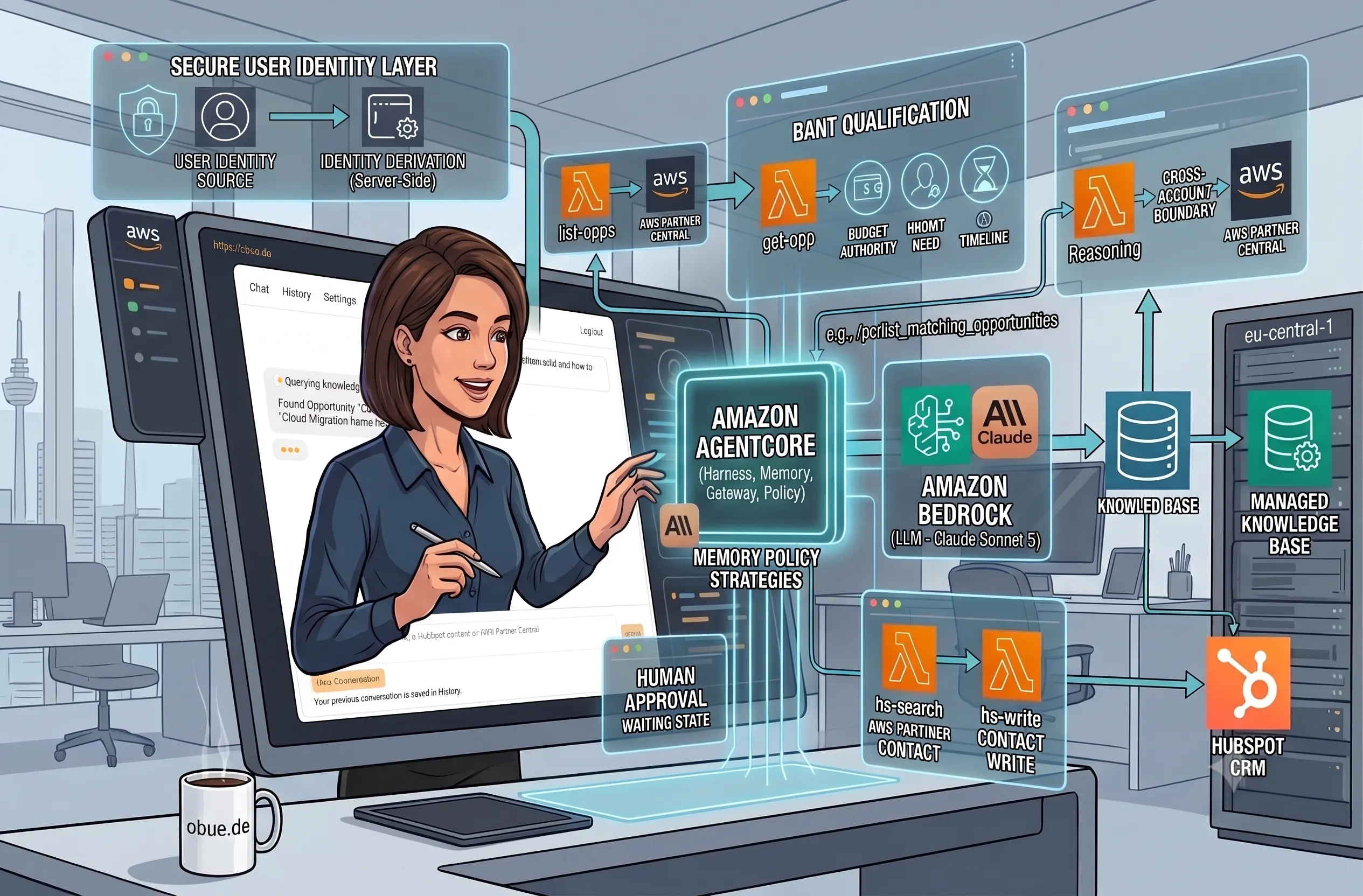
TL;DR: I built a chat agent on AWS Bedrock AgentCore Harness (running Claude Sonnet 5) that connects HubSpot and AWS Partner Central so sales reps stop manually re-typing opportunity data between the two systems — a rep types a company name, the agent finds the matching Partner Central opportunity, qualifies it against BANT criteria, answers questions from a knowledge base and after explicit human approval writes a contact back to HubSpot. Every tool call routes through one Gateway with Cedar policy enforcement, so the model's reach into either live system stays reviewable rather than baked into a prompt.
Part 1 of the series "Building a Partner Sales Agent on Amazon Bedrock AgentCore", built around one real project: a conversational agent that connects HubSpot CRM and AWS Partner Central for an AWS Partner's sales team. Everything described here is deployed and running. The build behind it is automated with Terraform, but nothing in this series requires that: every capability shown can be set up from the AWS Management Console. This article focuses on the general architecture of the demo.
Table of Content
- Article 1: Two Systems, One Sales Motion: An AWS Partner Agent on Amazon AgentCore Harness
- Article 2: Why I Didn't Write My Own Agent Loop: The Case for AgentCore Harness
- Article 3: Configuring AgentCore Runtime: Session Lifecycle, Container Backing, Memory
- Article 4: One Gateway, Six Tools: AgentCore Gateway as Your Agent's Only Way Out
- Article 5: A Deterministic Backstop for Your Agent: AgentCore Policy and Cedar
- Article 6: Grounding an Agent Without a Vector Database: AgentCore Managed Knowledge Base
- Article 7: From Company Name to CRM Record: One AgentCore Conversation, End to End
As company working in IT products, professional services and managed services, you need central customer relationship management (CRM) that is connected to your marketing and sales processes. This information usually covers contacts, deals, notes, follow-up tasks, marketing campaigns and much more. The entire sales motion lives here. A new lead arrives through a campaign, gets a contact record, moves through deal stages and every touchpoint lands in the same CRM the marketing team reports from. CRM systems are tailored to the company’s own processes and vary if you compare two similar companies. There are several well-established CRM tools in the market and some you might have heard about: Salesforce, Microsoft Dynamics, HubSpot.
I’m currently using HubSpot, so you will see curing this article series practical examples for HubSpot and it is also referred equivalent to any CRM.
When you are an AWS Partner co-selling Amazon Web Services solutions, you see the long arm of the AWS CRM: AWS Partner Central. The portal is the main entry gate for AWS Marketing and Sales processes. AWS tracks the same customer relationship on its side as a Partner Central opportunity. That record carries the fields AWS cares about for co-selling: the customer, the workload, budget signals, a target timeline, and the AWS account team attached to the deal. For a partner in a co-sell motion, keeping that record current is not optional bookkeeping. It's how the AWS side knows the deal exists, how it gets routed to the right people and part of how the partnership itself gets measured.
As an AWS Alliance Lead (caring about exactly the partnership with AWS) or a fellow Sales representative, keeping the company CRM world and AWS world in sync. Is a mandatory job for effective sales motion. With scaling organization and sales volume, this sync. can fast become a bottle neck. There were a few Connectors in the past (e.g. for Salesforce and Microsoft Dynamics), but they were barley usable and not flexible in case of heavy CRM customization.
To give you a concrete example: A sales rep qualifying a AWS originated opportunity hold both the CRM and AWS Partner Central open. He reads opportunity fields in Partner Central, retype the relevant parts into HubSpot and copies the notes he last reported to the AWS side. Each manual hop is a chance for the records to drift apart. The cost isn't just double data entry. It's a co-sell process running on stale information and a rep who quietly stops updating the system that isn't their daily driver.
Why solve this now and why this way? Partner Central Version 3 has been live since reinvent 2025 [1] and its opportunity data is reachable programmatically, including through a dedicated AWS Partner Central MCP server [2]. That is the integration surface this project builds on. The AWS side of the workflow stopped being a portal you log into and became something an agent can call.
A note on who this series is for: cloud engineers and AWS partners evaluating Amazon Bedrock AgentCore against exactly this kind of integration problem. It assumes you know IAM and the general shape of an LLM tool-calling loop. It is not an introduction to what an AI agent is and it never argues that you should want one. What you should be able to do by the end of this article is look at your own pair of disconnected systems and judge whether it fits the same shape this architecture was built for: two live systems of record, one conversational workflow spanning both and a hard requirement that the model's access to each stays reviewable.
What I set out to prove
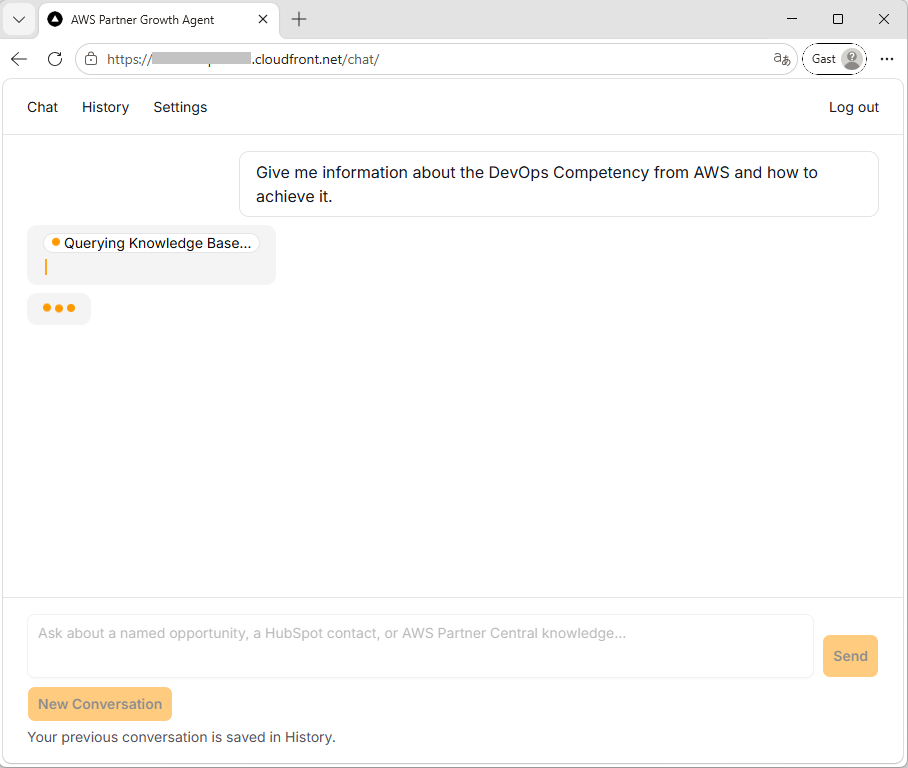
One chat conversation should carry the whole motion. A sales rep types a company name. The agent finds the matching Partner Central opportunity, qualifies it against BANT criteria (budget, authority, need, timeline), answers competency questions from a document knowledge base that contains both AWS documents as well internal Sales enablement material, proposes a HubSpot contact, waits for an explicit human approval and writes the contact to HubSpot with a back-reference to the opportunity it came from.
That conversation is the demo in article 7, run live against real HubSpot and Partner Central instances. The six articles before it are evidence for the claim, one building block at a time.
The stack in short: The agent runs on AgentCore Harness, AWS's managed agent loop, now generally available [3]. The model is Claude Sonnet 5 running on AWS Bedrock. Everything runs as managed services in a single AWS account in eu-central-1: no Kubernetes, no self-managed inference and nothing that a reader with AWS Management Console access couldn't replicate. My own build automates the full setup with Terraform, which pays off in repeatability and change review, but treats that as a bonus rather than a prerequisite. Each article names the things to configure and the values that matter, so a console-only reader can follow every step.
The architecture, top to bottom
Now the best part: The architecture diagram. This is an overview of the whole system. The rest of this article walks it region by region and the rest of this series zooms into it one region per article.
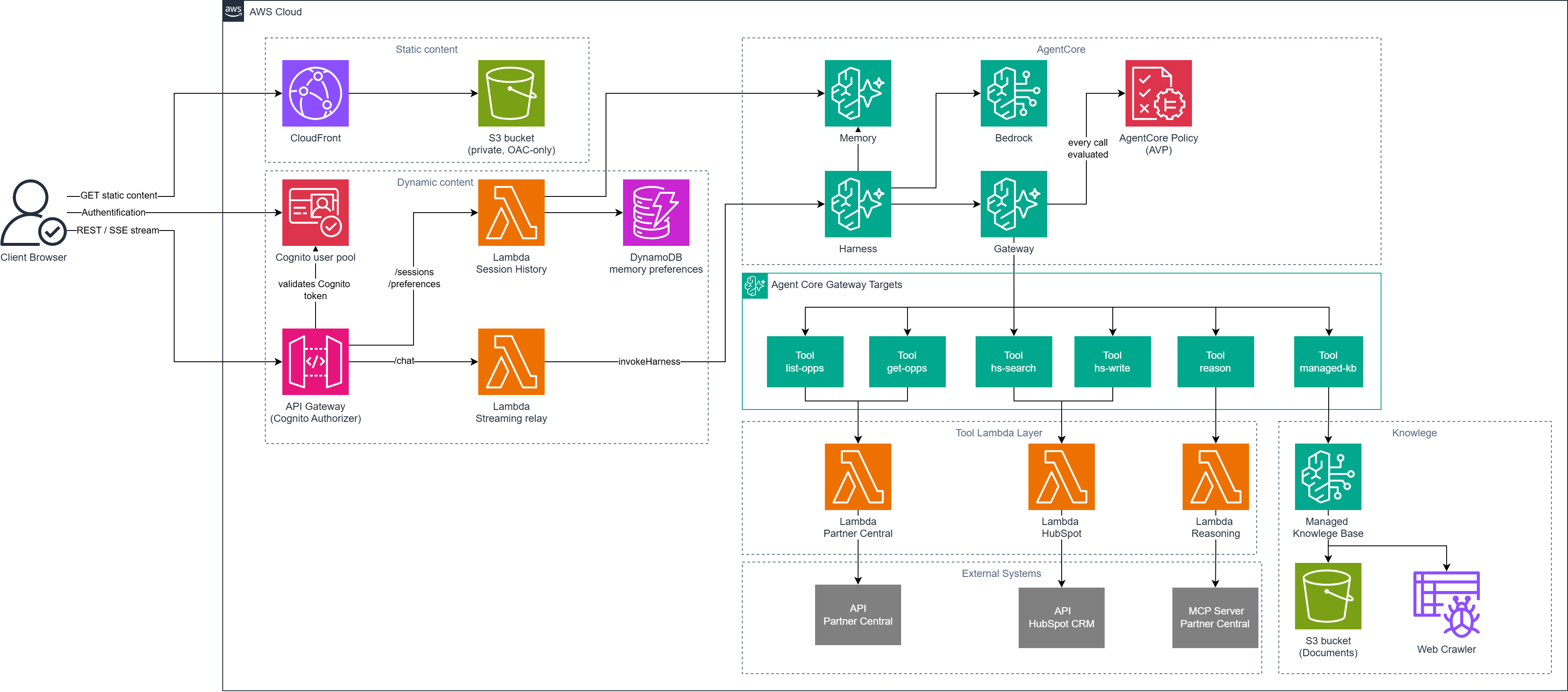
Read it in four horizontal bands: static content delivery (CloudFront, S3), Dynamic content (Cognito, API Gateway, Lambda functions), AgentCore (Harness, Memory, Gateway, policy engine) and the tool plane (six targets, three Lambdas, one knowledge base, three external systems). A user request enters at the left and every external effect exits at the bottom, through exactly one Gateway.
Static hosting
The frontend is a Next.js chat UI, statically exported. There is no Next.js server anywhere: the build produces plain files and configuration values like the Cognito client ID and the API endpoint are baked into the bundle at build time, because a static export has no server to read environment variables at request time.
Those files sit in a private S3 bucket with all public access blocked, served exclusively through CloudFront with Origin Access Control.
The bucket policy grants s3:GetObject to the CloudFront service principal only, condition-scoped to this one distribution's ARN and it deliberately never grants s3:ListBucketThat omission has a visible side effect worth knowing about: a request for a missing object returns 403 rather than 404, because without list permission S3 refuses to confirm that an object doesn't exist. Both status codes map to /index.html in the distribution's custom error responses, which is exactly what a single-page app needs for deep links to work.
What this region proves: the frontend is a normal static site with no server-side rendering in it. Every dynamic call goes through the “Dynamic Content” described next. The series doesn't spend a dedicated article on this region because none of it is AgentCore-specific and a well established pattern.
Dynamic Content: Cognito, API Gateway and a streaming relay
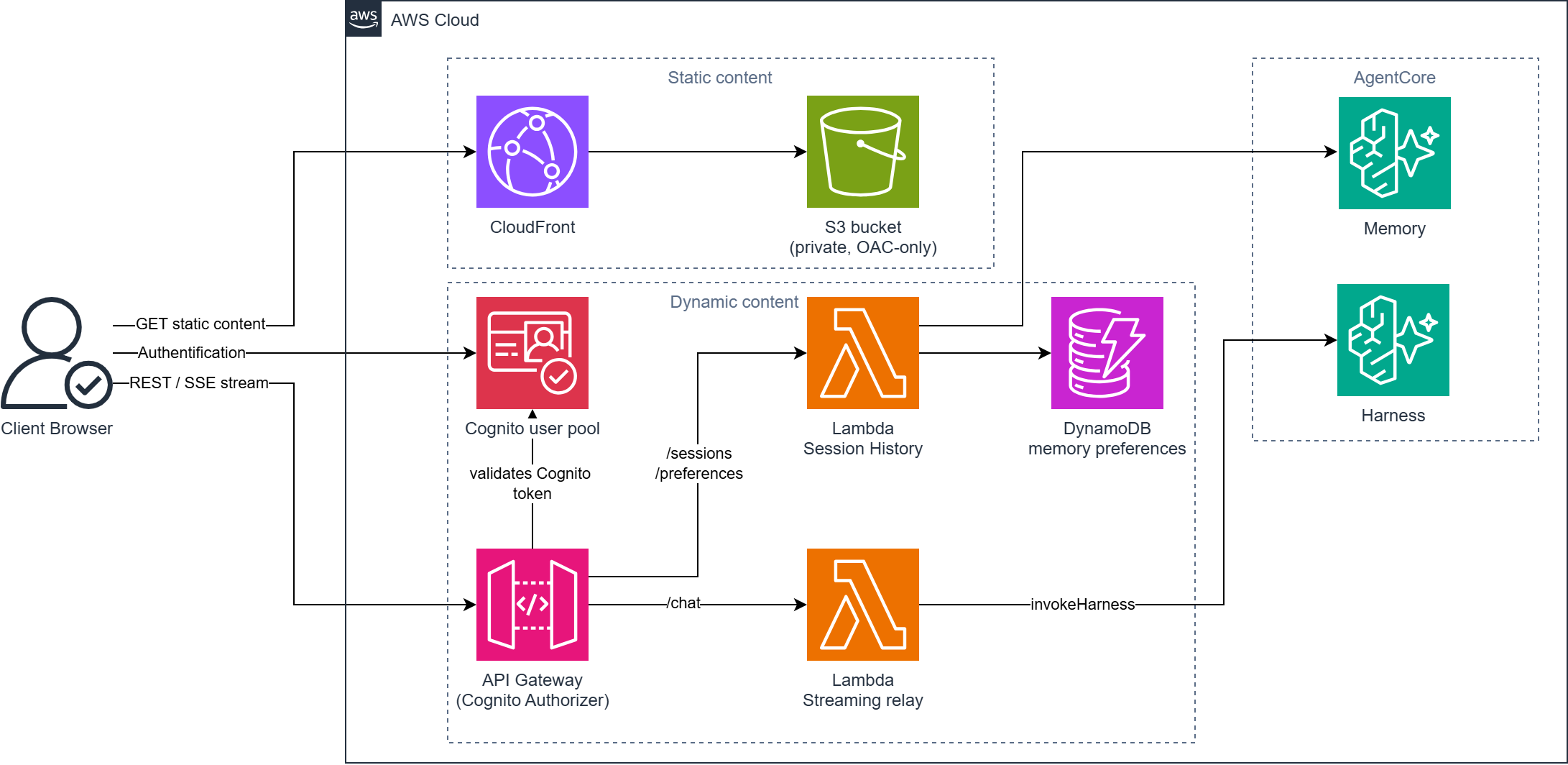
End users authenticate against a Cognito user. The frontent app client is public with no client secret, because a browser SPA cannot keep a secret anyway. One configuration detail cost me a debugging session and is worth passing on: the client's enabled auth flows needed SRP added [4], because AWS Amplify's signIn() defaults to the SRP flow and without that flow enabled the stock Amplify login path fails against an otherwise perfectly healthy pool.
The chat itself is a single streaming POST endpoint on a REGIONAL REST API. In front of it sits a native COGNITO_USER_POOLS authorizer that validates the caller's ID token before any compute runs. That placement buys a property I later confirmed in CloudWatch: a rejected or unauthenticated request produces zero billed Lambda invocations, because rejection happens at the authorizer, not inside application code you'd have to write, test and pay for.
Behind the authorizer sits the streaming relay and it is the project's one deliberate exception to an otherwise Python-only Lambda rule: it runs on Node.js because AWS Lambda response streaming is available only on Node managed runtimes [5]. The integration uses the function's response-streaming invoke ARN with the transfer mode set to STREAM, so the harness's output reaches the browser as a progressive Server-Sent-Events stream instead of one buffered blob at the end. A 90-second function timeout absorbs the first-token latency of a turn where the model calls several tools before it starts answering. The relay's other job is identity and it's load-bearing enough that a whole section below is devoted to the alternative it beat.
A second, non-streaming Lambda serves the supporting routes (/sessions, /preferences) behind the same authorizer, backed by a small DynamoDB table holding per-user memory preference flags.
What this region proves: authentication is enforced at the API boundary, streaming is a first-class transport decision rather than an afterthought, and none of it required AgentCore-specific code.
AWS's own reference architecture suggests a leaner architecture than mine: skip API Gateway and the relay Lambda entirely and let the browser call the harness directly [6]. The harness supports this through a native inbound JWT authorizer. You point it at an OIDC discovery URL, allow-list your Cognito app client and the browser invokes the harness over HTTPS with a plain Bearer token [7]; the AgentCore SDK even ships a real browser build with streaming support. I evaluated this and rejected it for one reason. The authorizer only gates the call: it validates the token's signature, issuer and audience, then lets the request through. It never binds any claim from that token to the request's actorId, the field AgentCore Memory partitions users by. actorId arrives as a plain payload field the client controls, so any authenticated user could send someone else's value and read that user's memory. AWS's own security guidance says as much: derive user identifiers from the authenticated principal, never from client-supplied values [8][9]. Closing the gap would mean verifying the JWT and deriving actorId inside the agent code. The relay already does exactly that in one place: deriveActorId() reads only the Cognito-verified sub claim, server-side and fails closed if it's missing. Deleting the relay wouldn't remove that logic; it would just move it somewhere with less separation from the model.
The AgentCore block: Harness, Memory, Gateway, Policy
Four managed pieces make up the agent itself.
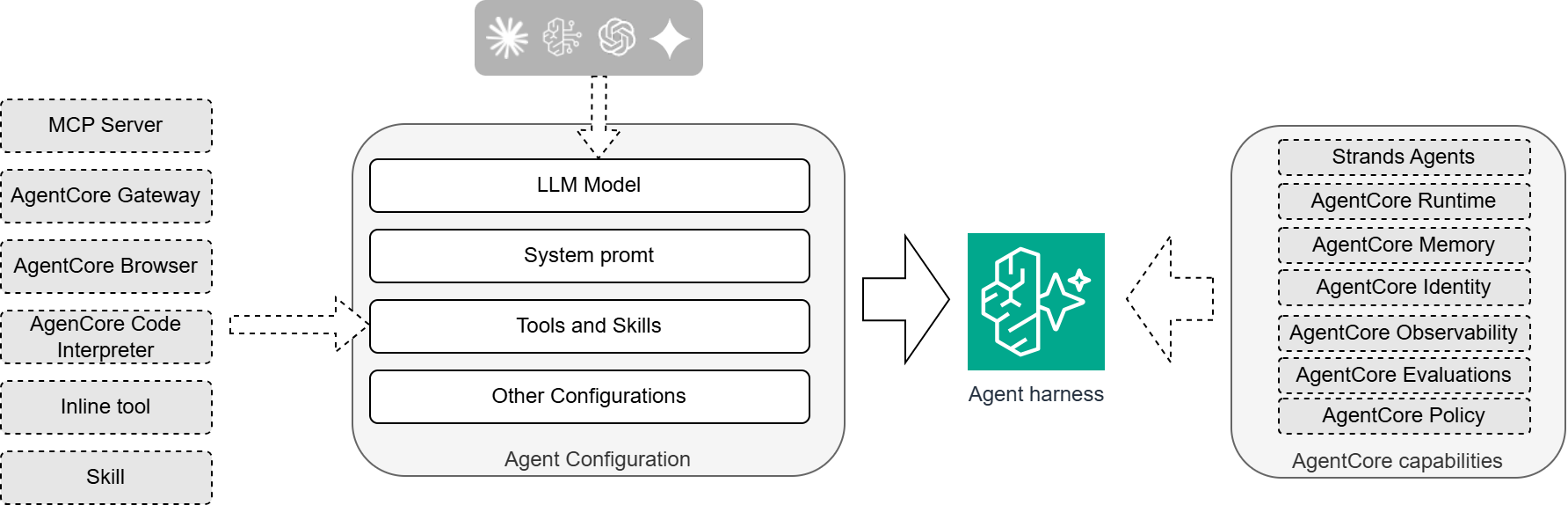
The harness is the agent loop: you hand it a model, a system prompt, tools, skills and a memory binding and AgentCore runs the loop that decides when to answer and when to call a tool. This project's harness runs the LLM Model Claude Sonnet 5 through the eu.anthropic.claude-sonnet-5 cross-region inference profile on AWS Bedrock. The harness is container-backed for exactly one reason: Skills are filesystem-path artifacts and a purely declarative harness has no filesystem to put them on, so the project's BANT-qualification Skill ships baked into a container image in ECR. The two other options for hosting skills (on S3 or a Git repository) where not supported by the Terrafrom AWS provider at the time of the demo creation [11].
AgentCore Memory gives the loop short-term session events plus four long-term memory strategies, which is what lets a user close the browser, come back and continue where they left off.
The Gateway is the single MCP endpoint the harness calls tools through and the Cedar policy engine (also used in Amazon Verified Permissions) is bound to that Gateway in ENFORCE mode, evaluating every single call before it reaches a target.
The structural decision that shapes everything else in the diagram: every external side effect the model can produce routes through that one Gateway. Which tools the model can even see is an allowlist on the harness. Whether a given call passes at all is a Cedar rule. The goal with this implementation is to reduce the blast radius of a misbehaving or manipulated model and bind it to a reviewable configuration and not only a system prompt text.
Wiring the harness to that Gateway is one small configuration step: on the harness, add a tool of type Gateway, point it at the Gateway, and set outbound authentication to IAM.
Two details here preview later articles, and they apply identically whether you configure this in the console or in code. The tool name pc is deliberately terse: AWS caps each tool-permission glob string at 64 characters and the tool name is part of every glob, so every character spent on a pretty name is a character taken from the tool names it has to match. A later article covers how I found that out, which involved the model narrating entirely fictional tool calls in prose while matching zero real tools. Outbound authentication set to IAM means the harness signs its own Gateway calls with its execution role's credentials. There is deliberately no OAuth configuration and no AgentCore Identity resource anywhere in this project, because it was not needed for this Demo architecture, but it can be useful in other setups.
What this region proves: the model's judgment is not the only thing standing between a user's prompt and a live CRM write.
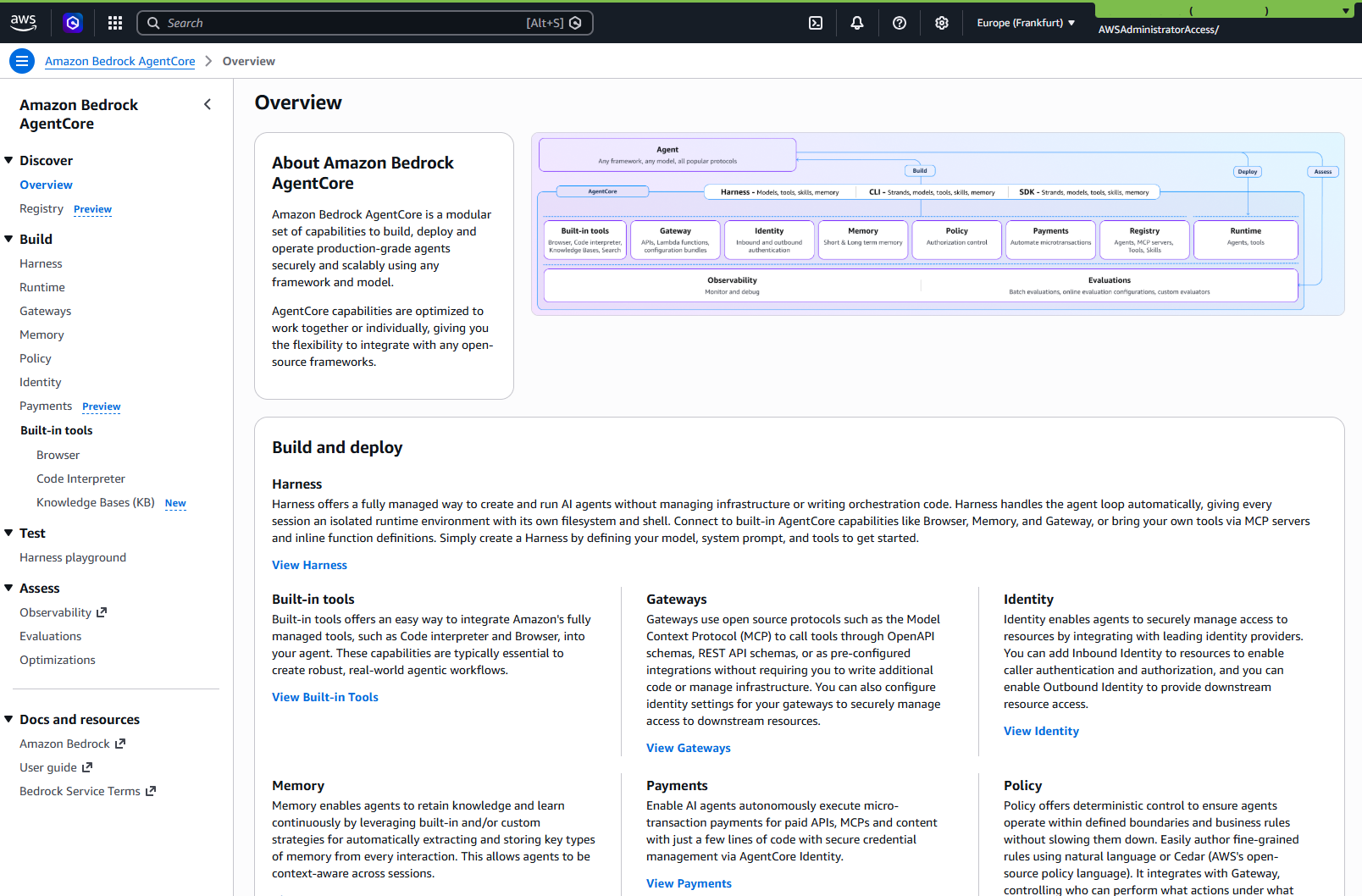
Six Gateway targets behind one door
A "Single Gateway" does not mean "one tool". It means one path out into six governed targets:
| Target | Backend | What the model gets |
|---|---|---|
list-opps | Partner Central Lambda | list_matching_opportunities: find opportunities by company name |
get-opp | Partner Central Lambda | get_opportunity: the full record plus a BANT-source view |
reason | Reasoning Lambda | reason_about: open-ended questions against Partner Central MCP server |
hs-search | HubSpot Lambda | search_contact: look up a contact before proposing a write |
hs-write | HubSpot Lambda | upsert_contact: the one write path in the whole system |
managed-kb | Knowledge Base connector | Retrieve and AgenticRetrieveStream: grounded document search |
A few of these carry details worth knowing even at map level. The get-opp tool returns the opportunity plus a bant_source_fields view in which any missing field renders as the literal string "Not stated in opportunity data": the qualification the model produces later must distinguish evidence from absence and that contract is enforced in the tool's own output rather than left to the model's discretion. The hs-write target is guarded by a Cedar rule that rejects any call missing an explicit confirmation flag, which a later article dissects along with what that guard honestly does and does not verify. The managed-kb target is an ordinary Gateway target from the console's point of view.
The obvious architecture question: both HubSpot and Partner Central ship their own MCP servers, so why is every target a Lambda instead of a direct MCP connection? Two different blockers and naming them matters because they generalize.
- HubSpot's MCP server mandates OAuth Authorization-Code with PKCE, which at build time collided with an open AgentCore Identity bug for custom OAuth2 providers [10]
- Partner Central's MCP server speaks a
sendMessage/getSessiontransport that doesn't match the Gateway's session handshake, a genuine protocol mismatch no configuration can bridge; so the reasoning Lambda makes the SigV4-signed MCP call itself, one hop and the Gateway routes to the Lambda. A future article resolves both stories in full, including the outbound-auth support matrix that independently forces the same design.
What this region proves: a governed Lambda wrapper is not an admission that MCP integration failed. It's frequently the only path that satisfies auth, transport and review requirements at the same time.
The backing Lambdas
Every tool call terminates in a piece of infrastructure with its own scoped IAM role, not in code embedded in the harness. That sentence sounds obvious and is the quiet backbone of the whole security story.
Three Lambda functions back the five Gateway targets. The Partner Central Lambda holds two deterministic opportunity tools. The reasoning Lambda holds the open-ended reason_about tool and is the only principal in the workload account that can assume a cross-account role into the PartnerCentral AWS account. The HubSpot Lambda holds both HubSpot tools and is the only principal that can read the HubSpot token stored in AWS Secrets Manager. This reduces the attack surface in case any other component is compromised.
This is also where the harness's own identity boundary shows. The harness executes as one role, which covers model calls, Memory access and signing Gateway requests. It has no HubSpot scope, no Partner Central scope or no Secrets Manager scope. Capability lives with the tool, not with the agent, so granting the agent a new ability is a scoped change to one Lambda's role, reviewable on its own, whether you manage roles in the console or in code.
The external systems
Two live systems sit at the bottom of the diagram and neither of them is a mock.
HubSpot is a real demo CRM instance, reached through its REST API with a Private App token holding exactly two scopes: contacts read and contacts write.
Partner Central is the real AWS-side system, reached through its MCP server. Its client is pinned to us-east-1 because Partner Central exposes no eu-central-1 endpoint, a mismatch with the rest of the demo stack's region.
AWS cross-account access: the demo account's two Partner-Central-facing Lambda roles assume a single, read-only IAM role in the Partner Central AWS account. That role's permission set stays deliberately narrow and it carries no write actions of any kind: this agent can read and reason about opportunities and it structurally cannot create or modify them on the AWS side.
What this region proves: the demo exercises two genuinely external systems with real credentials and real failure modes, which is where most of the build's surprises came from.
Why there is no database in that diagram
Look at the diagram once more and notice what's absent. No Aurora. No OLTP database. No vector store. The only DynamoDB table holds boolean preference flags. For a system that reads, qualifies and writes sales data, that absence is the second-biggest architectural decision after the Gateway chokepoint.
The reasoning: HubSpot and Partner Central are already the systems of record for their own data. Building a third store that mirrors them would recreate the exact synchronization problem the agent exists to remove and it would need schema, migrations, backups and a sync job to stay honest. The demo architecture reference is explicit that an independent system of record was ruled out of scope on purpose: the agent operates on the two live systems and the only data this project owns outright is a folder of documents.
Those documents, AWS Partner Central material plus the partner's own sales-enablement content, ground the agent through a Bedrock Managed Knowledge Base. The managed variant reduces the entire setup to choosing the managed type and accepting the service's own defaults for embedding model, chunking, and encryption. So, there is no index to design and no retrieval code to write. It also brings a native Gateway connector, which means retrieval enters the agent through the same gateway as every other tool. A subsequent article shows the full setup, including the web crawler sources layered on top of the S3.
Before reusing this pattern, ask the question it depends on: do I already have systems of record or am I about to make my agent's database the system of record? This architecture only stays this small because the answer here was the first one. A project without upstream systems of record needs a real data layer and no Gateway diagram makes that requirement go away.
The road I didn't take: calling the harness straight from the browser
Every article in this series names at least one path I evaluated and rejected, with the specific reason. Here is the first. During the implementation, the relay Lambda started to look like too formal setup. AgentCore Harness supports a native inbound JWT authorizer: configure it with an OIDC discovery URL, allow-list of your Cognito client and a browser can call the harness directly over HTTPS with a plain Bearer token. No API Gateway, no relay Lambda, two fewer pieces of infrastructure. This is not an obscure option. The AgentCore SDK is published with a genuine browser build, streaming responses are supported on the direct call and AWS's own reference architectures wire frontends to agents exactly this way [6].
I read the developer guide closely before deleting anything and one gap decided the question. The inbound authorizer authenticates the call. It verifies the token's signature, issuer and audience and then lets the request through. What it does not do is bind any claim from that token to the request's actorId, the field that partitions AgentCore Memory between users. actorId is a plain payload field, structurally identical however the caller authenticated and nothing server-side ties it to the identity that logged in. AWS's own security documentation is candid about the adjacent mechanism, describing the related user-ID header as an opaque identifier that is not verified against an authenticated identity and prescribing exactly the mitigation you'd expect: derive the user identifier from the authenticated principal, never from client-supplied values [8].
Follow the consequence through. With direct browser calls, any authenticated user could put any actorId they like in the payload and read the agent's memory of another user: their past sessions' context, their preferences, whatever the memory strategies have accumulated. The relay closes this by construction. Its deriveActorId() reads only the Cognito-verified sub claim from the validated token, server-side and fails closed if the claim is absent. The client is unaffected and has no surface to send a wrong actorId.
So the lambda relay stays and the decision reframed what the relay is. It's not a middleman, it's a component that guarantees isolation. I verified the property live and a second Cognito user replaying a stolen session ID receives none of the first user's memory context.
The transferable lesson is the method, not the conclusion. The option was real, supported and documented by AWS itself. It still lost to a specific problem after reviewing the security. Sometimes a preference is not a decision you can make.
Transferable patterns
Three habits from this article generalize beyond this demo to any agent build.
- A single Gateway as a blast-radius control. Route every external side effect the model can trigger through one governed endpoint, so the callable tool set, each tool's permissions and the per-call guard rules all live in reviewable configuration. The alternative, capability scattered across the agent's own code and prompt, has no configuration surface to review.
- "No independent system of record" as a scoping heuristic. Before building your agent a database, check whether the systems you're integrating are already the systems of record. If they are, a mirror store is scope you don't need and a consistency bug you haven't had yet.
- Evaluate-and-reject as a habit. For each major design choice, name the more idiomatic-looking alternative, check it against primary documentation and record the specific reason it lost. The Inbound Auth story above is the first in this series.
If you are reproducing this
Three things will bite you in the first hour if you stand this architecture up yourself, console or code. All three come from this project's own build history.
First, two AWS accounts are involved and only one of them is yours to automate. Every resource in the diagram lives in the workload account. The Partner Central AWS account holds exactly one created, read-only IAM role that the workload account's two Partner-Central-facing Lambda roles assume into. Create that role first, in the Partner Central account's IAM console and list both Lambda execution role ARNs explicitly as trusted principals in its trust policy: granting sts:AssumeRole on the workload side alone is not sufficient and the failure mode is a runtime AccessDenied long after setup looked complete.
Second, model access. Claude Sonnet 5 is a marketplace-gated Bedrock model whose usage agreement must be accepted once per account before any tool-using invocation succeeds. I learned this from a live AccessDeniedException referencing aws-marketplace:Subscribe on a full-admin session, which ruled out an IAM misconfiguration and pointed at a genuinely unaccepted offer. Accept the agreement once (the Bedrock console's model-access page is the direct route), make sure the identity doing it carries aws-marketplace:Subscribe and aws-marketplace:ViewSubscriptions and note that the agreement machinery lives in us-east-1 regardless of your workload region. As a bonus for automation-minded readers: A recent update of the AWS terraform provider lets you reproduce this with a terraform resource.
Third, ordering. A container-backed harness references a container image that must already exist in ECR before the harness itself can be created, which is a genuine chicken-and-egg on a fresh account: create the ECR repository first, build and push the image (linux/arm64 is required) and only then create the harness. I found this on the first live terraform apply. The same ordering applies in the console; automation just makes it easier to get wrong in one shot.
I hope this article was use-full for you. I would love to receive feedback on what you liked and disliked, so that I can improve any future article.
Sources
[1] AWS Partner Central v3 availability. https://aws.amazon.com/de/blogs/aws/aws-partner-central-now-available-in-aws-management-console/
[2] AWS Partner Central agents now guide new partners from registration to ready-to-sell . https://aws.amazon.com/about-aws/whats-new/2026/06/aws-partner-central/
[3] Amazon Bedrock AgentCore Harness general availability. https://aws.amazon.com/about-aws/whats-new/2026/06/amazon-bedrock-agentcore-harness-generally-available/
[4] AWS Amplify documentation: signIn() uses the SRP flow by default. https://docs.amplify.aws/react/frontend/auth/switching-authentication-flows/
[5] AWS Lambda documentation: response streaming is available on Node.js managed runtimes only. https://docs.aws.amazon.com/lambda/latest/dg/configuration-response-streaming.html
[6] AWS reference implementations of the direct browser-to-agent pattern: the aws-samples/sample-amazon-bedrock-agentcore-fullstack-webapp starter template (https://github.com/aws-samples/sample-amazon-bedrock-agentcore-fullstack-webapp) and the AWS Builders article "Skip the Middleman: Connecting Your UI Directly to an AI Agent via WebSocket" (https://dev.to/aws-builders/skip-the-middleman-connecting-your-ui-directly-to-an-ai-agent-via-websocket-29f7).
[7] AWS Bedrock AgentCore developer guide. "Configure inbound JWT authorizer": https://docs.aws.amazon.com/bedrock-agentcore/latest/devguide/inbound-jwt-authorizer.html
[8] AWS Bedrock AgentCore developer guide. "Authenticate and authorize with Inbound Auth and Outbound Auth": https://docs.aws.amazon.com/bedrock-agentcore/latest/devguide/runtime-oauth.html
[9] AWS Bedrock AgentCore developer guide. "Get workload access token": https://docs.aws.amazon.com/bedrock-agentcore/latest/devguide/get-workload-access-token.html
[10] GitHub, aws/bedrock-agentcore-sdk-python issue #158: open AgentCore Identity bug for custom OAuth2 providers. https://github.com/aws/bedrock-agentcore-sdk-python/issues/158
[11] Missing skill support for S3 and Git as source. https://github.com/hashicorp/terraform-provider-aws/issues/48540