Why I Didn't Write My Own Agent Loop: The Case for AgentCore Harness
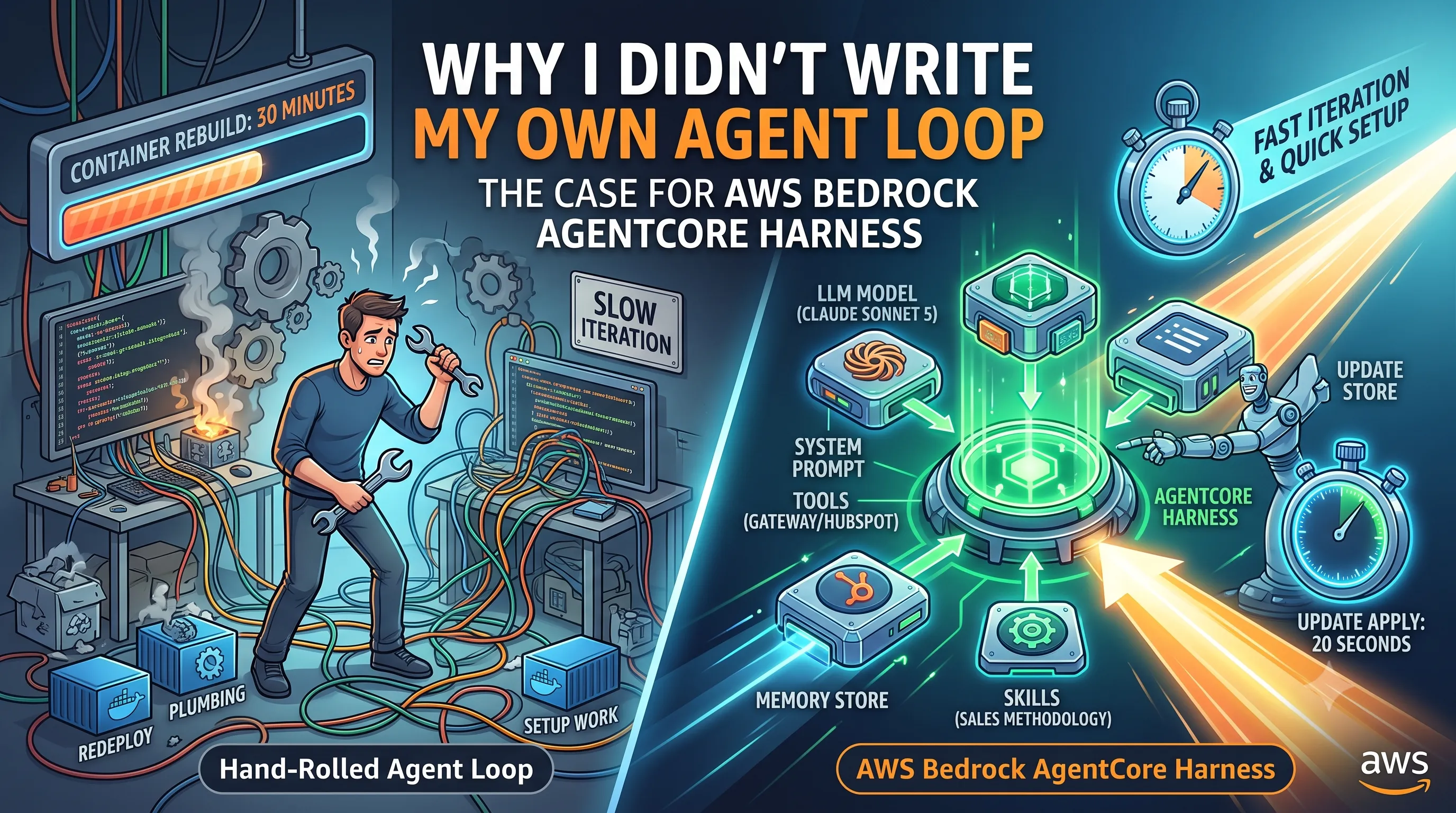
TL;DR: I skipped writing my own agent loop and put this project on AWS Bedrock AgentCore Harness instead, because a hand-rolled loop would have cost me setup work, slow iteration and tool-integration plumbing that has nothing to do with qualifying a sale. A harness needs only two required parameters, a name and an execution role, and every other block (model, prompt, tools, skills, memory) attaches later and updates in place in about 20 seconds. The sharpest finding: container-backing a harness for a filesystem Skill does not have to mean granting the model shell access and I kept those two decisions separate on purpose.
Part 2 of the series "Building a Partner Sales Agent on Amazon Bedrock AgentCore", built around one real project: a conversational agent that connects HubSpot CRM and AWS Partner Central for an AWS Partner's sales team. Article 1 walked the whole architecture while this article argues for the piece at its center, the managed agent loop, before anything gets configured. Everything described here is deployed and running, and every setup appears console-first, with Terraform and boto3 behind my own build.
Table of Content
- Article 1: Two Systems, One Sales Motion: An AWS Partner Agent on Amazon AgentCore Harness
- Article 2: Why I Didn't Write My Own Agent Loop: The Case for AgentCore Harness
- Article 3: Configuring AgentCore Runtime: Session Lifecycle, Container Backing, Memory
- Article 4: One Gateway, Six Tools: AgentCore Gateway as Your Agent's Only Way Out
- Article 5: A Deterministic Backstop for Your Agent: AgentCore Policy and Cedar
- Article 6: Grounding an Agent Without a Vector Database: AgentCore Managed Knowledge Base
- Article 7: From Company Name to CRM Record: One AgentCore Conversation, End to End
The problem a harness solves
The agent loop itself is a weekend project. Send the conversation plus the tool definitions to a model, read back either text or a tool call, execute the tool, append the result, loop until the model stops asking for tools. I have written that loop before. If that were the whole job, this article would not exist.
The cost sits in everything around the loop. When I priced out what this demo would need without a managed runtime, the list split into three buckets.
Setup. Before the loop runs once, you need model wiring, an orchestration framework, a runtime environment to host the loop, a deployment path for that runtime, and memory integration on top.
Iteration speed. A hand-rolled loop bakes its configuration into a service you own, so every change is a redeploy of that service: a new tool, a reworded system prompt, a different model. This build reworked its system prompt repeatedly against live test results and because the prompt is harness configuration rather than application code, each rework was an update apply that completed in about 20 seconds with nothing redeployed. That difference compounds. Prompt tuning at 20 seconds per attempt is a different activity from prompt tuning at one container build per attempt.
Tool integration. Memory, retrieval, browsers, code execution, and external APIs all attach differently and each source brings its own transport and auth story. There is no common connector layer you get for free in a hand-rolled loop. This one demo connects six Gateway-fronted tools across four targets, a filesystem Skill, and a memory store. Every one of those integrations is configuration on the harness rather than code I maintain and the code that does exist lives behind the Gateway, never inside the loop.
Concretely: without a harness, this project would have needed its own agent loop, its own tool-dispatch logic, its own session and memory wiring, and its own container orchestration before the agent answered a single BANT (budget, authority, need, timeline) qualification question. The demo's value lives in its tools, its guardrails, and its prompt. None of it lives in the loop.
Those three buckets are also the reusable takeaway. Run them as a checklist against your own planned build. If you have one tool, no memory requirement, and an existing service that can host the loop, hand-rolling is defensible and keeps you in full control of the loop's internals. This build failed the checklist on all three counts, which is what put AgentCore Harness, now generally available [1], at the center of my first article's architecture.
What a harness actually is
A harness is a fully managed agent loop. You hand AgentCore a configuration: which model, which system prompt, which tools and skills, which memory. AgentCore runs the loop that decides when to answer and when to call a tool [2]. There is no framework code to write and no service of your own to keep alive.
In the AWS Management Console, the harness lives in the Amazon Bedrock AgentCore console under Build, alongside Runtime, Gateways, Memory, Policy, and Identity; a separate Test section holds the harness playground used later in this article.
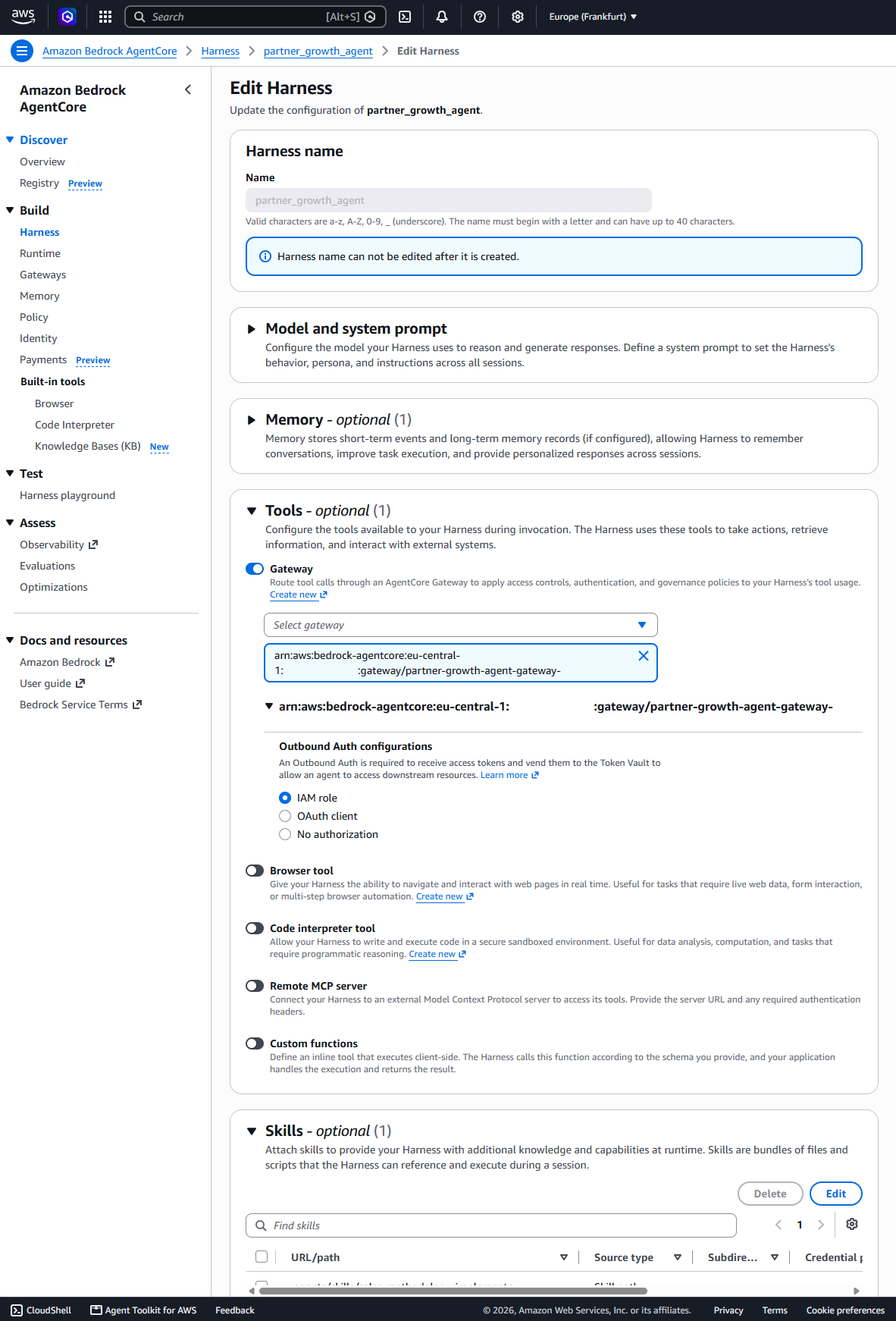
The API asks for exactly two things, a harness name and an execution role ARN, and the console's create form mirrors that split. Everything else on that form is optional: model, system prompt, tools, skills, memory, timeouts, environment settings. All of it can be added later on an update, and most of it can even be overridden per invocation [2]. In the Management console AWS takes care of the execution role creation based on the harness name. You actually only the name of the harness is needed to get started.
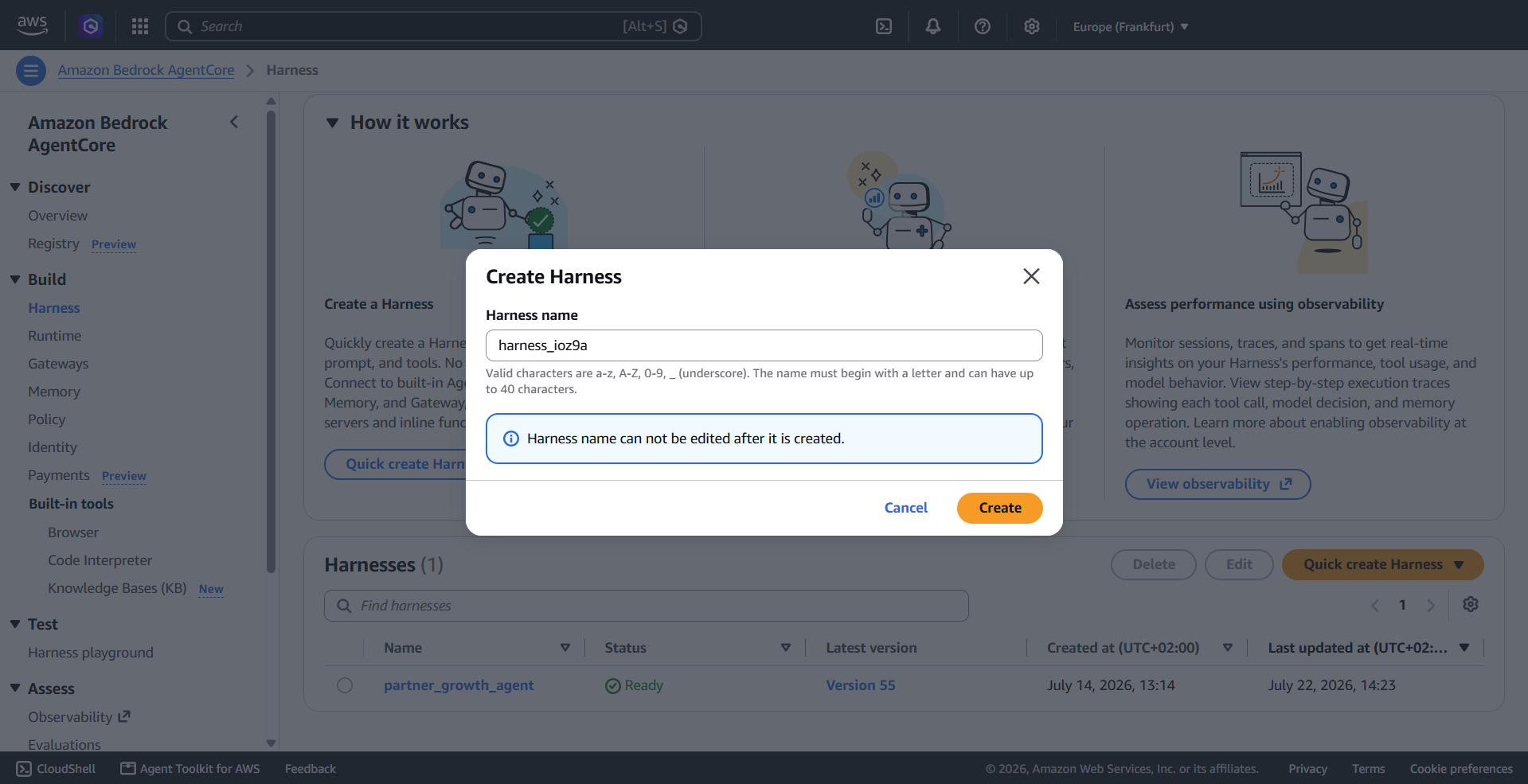
The two-parameter claim holds outside the console too. The Terraform provider's schema for aws_bedrockagentcore_harness marks just two top-level attributes as required, harness_name and execution_role_arnand a boto3 call is as simple as this [2]:
import boto3client = boto3.client("bedrock-agentcore-control")harness = client.create_harness( harness_name="MyFirstAgentWithHarness", executionRoleArn="<your_harness_execution_role>")The fuller shape as boto3 eqivilant, with the optional blocks this project uses, looks like this:
harness = client.create_harness( harness_name="MyFirstAgentWithHarness", executionRoleArn="<your_harness_execution_role>", system_prompt={"text": "You are a helpful assistant"}, model={"bedrockModelConfig": { "modelId": "eu.anthropic.claude-sonnet-5" }}, skills={"path": "<path_to_skill>"}, tools=[{ "type": "agentcore_gateway", "name": "mygatewaytools", "config": {"agentCoreGateway": { "arn": "<gateway_arn>" }} }])The model id there is the one this project deploys: eu.anthropic.claude-sonnet-5, the EU cross-region inference profile rather than the bare model id. My shipped harness ended up using most of the major optional blocks this API offers:
- a model block
- a long rule-numbered system prompt
- a Gateway tool binding
- a Skill
- a memory attachment
- explicit tool allowlist
Not one of those was required to get the first harness running. I started near the two-parameter shape and grew the configuration one apply at a time and I would recommend that order: a name and a role on the first deploy, then each optional block only when the build demands it. There is also a CLI middle path: agentcore create scaffolds a new agent project, with a harness project as one of the types its wizard offers, creatable non-interactively with flags [3].
Control plane versus data plane
AgentCore splits the harness API in two. Five control-plane operations manage the harness as a resource: CreateHarness, GetHarness, ListHarnesses, UpdateHarness, DeleteHarness. One data-plane operation runs it: InvokeHarness [4]. Boto3 ships the split as two separate clients, bedrock-agentcore-control and bedrock-agentcore. I mapped this at the start of the build by listing the installed SDK's available services (boto3 1.43.56) instead of trusting documentation, because the service was new enough that the SDK and the docs could disagree.
The split shows up physically in my build. Terraform's aws_bedrockagentcore_harness resource wraps the control plane: plan and apply translate to Create, Get, and Update calls. The streaming relay Lambda from article 1's Dynamic content speaks only the data plane, through the JavaScript SDK's InvokeHarnessCommand, at request time. Two SDK surfaces, two clients, no overlap.
That separation buys a security property. The relay's execution role carries the data-plane invoke grant and nothing from the control plane, so the component that runs the agent for end users cannot reconfigure the agent. Terraform holds the control-plane credentials and never runs at request time. Configuring a harness and running a harness are two distinct operations against two distinct APIs, which is why the Terraform code and the relay Lambda never touch each other's calls and more usefully, why they cannot.
From configuration to a running agent
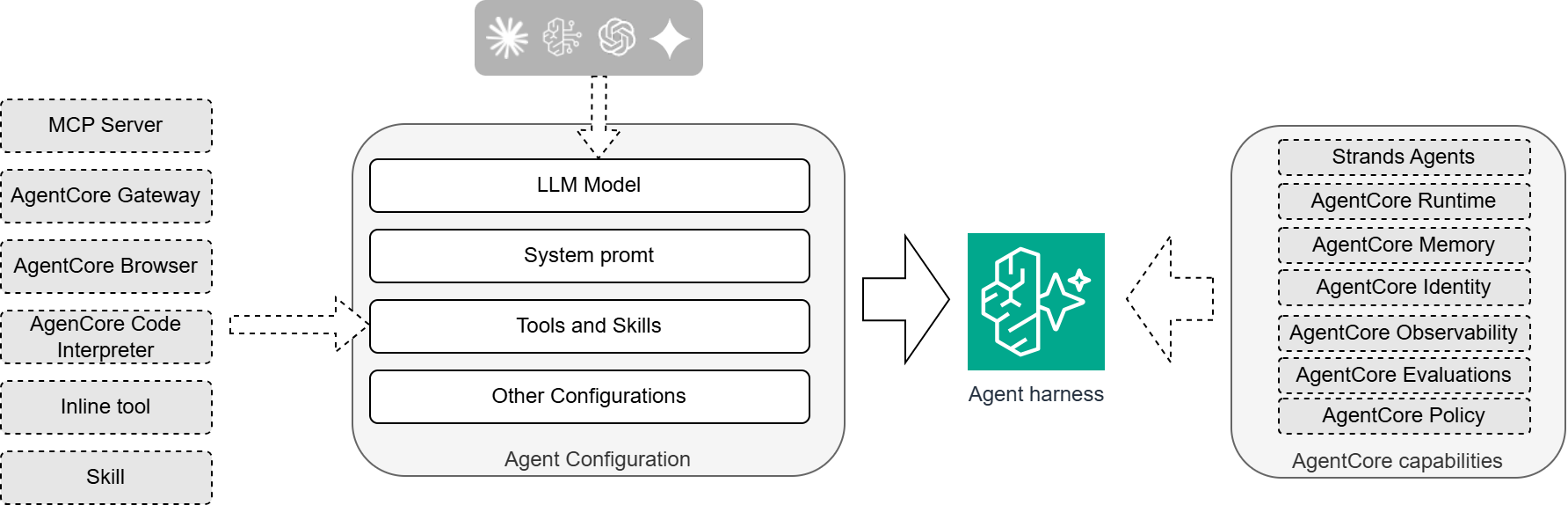
Read it left to right. The agent configuration holds four rows: the model, the system prompt, tools and skills, and everything else (timeouts, iteration caps, environment). Six kinds of tool source can feed the tools row: a remote MCP server, an AgentCore Gateway, the managed Browser, the managed Code Interpreter, an inline tool executed on the client side, and a Skill. The configured harness then draws on the platform capabilities on the right: Runtime hosts it, Memory persists across sessions, Identity handles inbound auth, Observability traces it. Underneath all of that sit the runtime features the harness inherits: long-running sessions, attachable storage, shell command execution, microVM isolation, and the option to bring your own container image [2].
Mapping that diagram onto this project keeps it honest. Of the six tool sources, I use two: one Gateway binding that fronts all six of article 1's Gateway targets (article 4 opens that up), and one Skill. Of the capabilities column, Runtime and Memory are load-bearing (article 3 configures both), Observability supplied the tool-call traces I later used to measure a prompt-compliance problem (article 5 puts a number on that story), and Identity goes unused: article 1's inbound-auth investigation explains why a token-validating relay beat it. And the bottom-row container option is in this build for one specific reason, not as a default.
That reason is Skills. A Skill is a directory of instruction markdown and supporting files, sometimes including scripts, that the harness loads for the model on demand, and the skills parameter, in the path form this project uses, points at content already on the harness filesystem. It uploads and installs nothing itself [5]. A purely declarative harness has no filesystem to point into, so the skill directory has to arrive some other way, and baking it into a custom container image is the way this project ships it. The whole Dockerfile is a FROM and a COPY; the image is purely a filesystem layer, never a running process of mine [6].
The Skill itself is not my writing, and that belongs on the record: I vendored sales-methodology-implementer verbatim from the MIT-licensed github.com/OneWave-AI/claude-skills repository at a pinned commit [7]. Its files also cover MEDDIC, Sandler, Challenger, and SPIN, and I kept all of that in place. Restricting the demo to BANT is one instruction in the system prompt, not file surgery on someone else's skill.
Attaching the container brought the first surprise. I expected converting a declarative harness to a container-backed one to force a destroy-and-recreate, and had planned around that blast radius. The live plan read 2 to add, 1 to change, 0 to destroy: adding the container artifact and the skill, changing the system prompt, all as an in-place update. The console's edit flow drives the same update API [4], so the in-place behavior is no Terraform quirk; my plan was simply wrong about the blast radius, in the good direction for once. Article 3 walks the conversion in configuration detail, plan output and build tripwires included.
The harder edge came from the same Skill mechanism. A Skill's content is fetched onto the harness filesystem and injected into the model's context, and for a methodology Skill that is the entire job. But if a Skill bundles a script, the only AgentCore-native mechanism that runs it server-side is the harness's built-in shell tool, which executes inside the harness's microVM with the harness's own execution-role credentials. There is no separate, scoped skill-execution role, and no "run only this one script" tool type [8]. I did not take that on faith. I built a second, read-only Skill, partner-central-lookup, wired it as a second skill block, added its one dependency to the image, and gave the harness a narrowly scoped sts:AssumeRole grant. Making it executable then required adding shell to the harness's allowed_tools, and that list turned out to be an allowlist in the strict sense, not a filter: because my harness had carried an explicit, restrictive allowlist from the first week, the built-in shell and file_operations tools had been silently excluded the entire time.
Granting shell would not have restored something already present; it would have added a new capability outright: arbitrary in-container command execution, on a harness that in the same session holds knowledge-base retrieval over crawled web content and a cross-account role into Partner Central. I chose to keep the capability permanently inert rather than switch it on, and in a later v1.1 cleanup I removed partner-central-lookup entirely, since an inert, never-executed capability carries no ongoing value. The sales-methodology-implementer Skill is unaffected, and it remains the one live reason this harness is container-backed at all.
One adjacent warning from the same documentation page: the InvokeAgentRuntimeCommand API executes commands in the harness microVM directly, without passing through the model or the allowed_tools gate at all [8]. Nothing in this project's IAM grants it, anywhere.
The decision rule I took away: before container-backing a harness for a Skill, decide whether the Skill needs to execute a bundled script at all, or whether the context-injection behavior alone does the job. For this project, context injection was the whole value, and shell never earned its risk.
Invoking it
The invocation surface is small: a prompt goes in, the configured loop runs, an output comes back.
In the console, the harness playground under Test drives this flow interactively: pick the harness, type a message, watch the response stream in. That playground was my second-fastest verification path throughout the build.
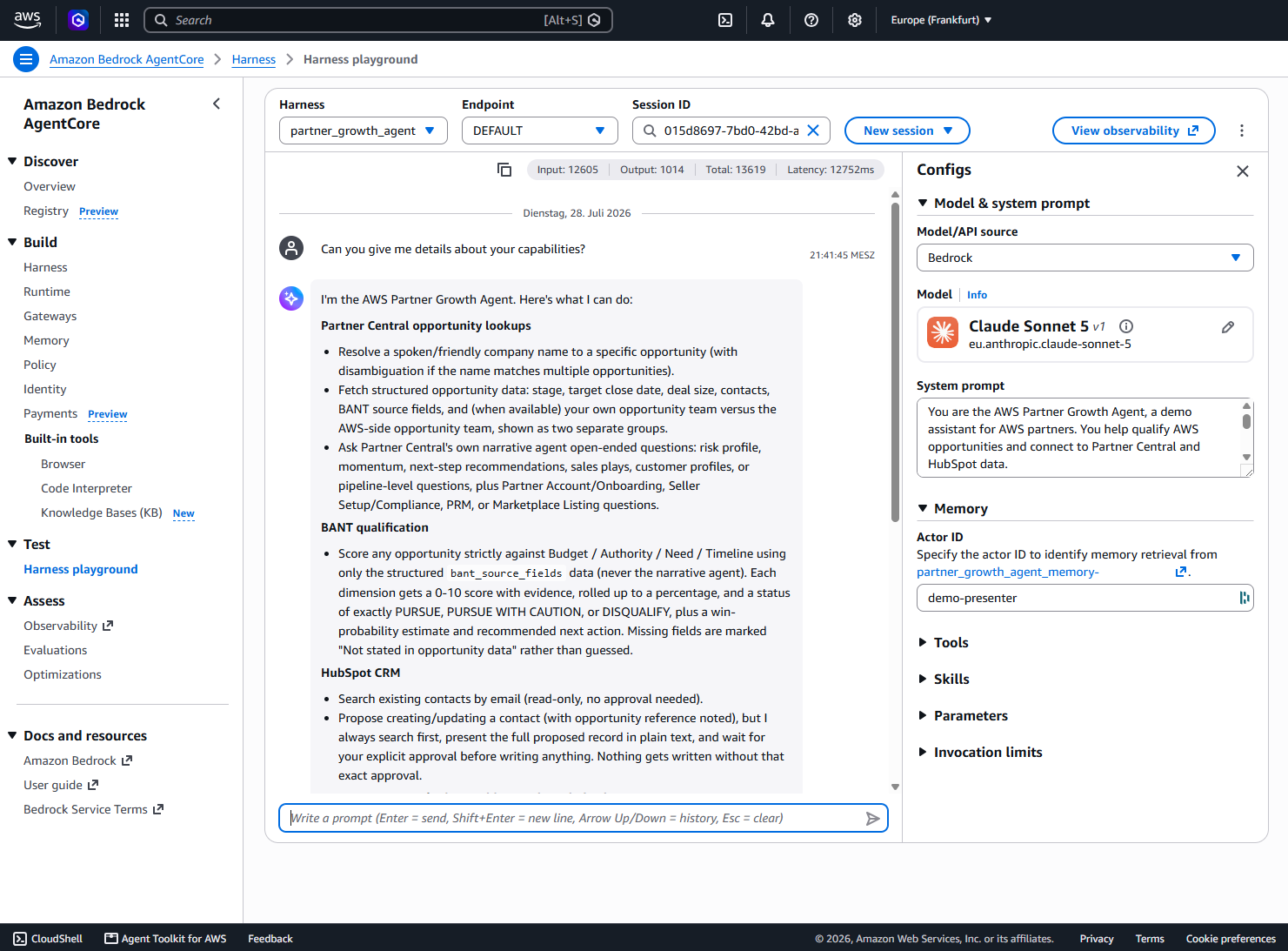
The fastest one is a script. Standing up the first live invocation taught me three things. The data-plane operation is named InvokeHarness, not the shorter name I had assumed. It wants the harness's full ARN rather than a bare id and the response is an event stream (messageStart, contentBlockDelta, contentBlockStop, and error events), not a single blob. Condensed from the shipped script, the call is:
import boto3client = boto3.client("bedrock-agentcore", region_name="eu-central-1")response = client.invoke_harness( harnessArn=harness_arn, # the full ARN, not a bare harness id runtimeSessionId=session_id, # one uuid4 per conversation messages=[{"role": "user", "content": [{"text": prompt}]}],)text_chunks = []for event in response["stream"]: if "contentBlockDelta" in event: delta = event["contentBlockDelta"].get("delta", {}) if "text" in delta: text_chunks.append(delta["text"]) elif "validationException" in event: raise RuntimeError(f"Harness validation error: {event['validationException']}")Two notes on what the condensation hides. The shipped script also surfaces internalServerException and runtimeClientError events as errors. It does not hardcode invoke_harness at all: it resolves the operation name from the installed client's own method map, because the data-plane operation name has shifted across SDK revisions.
That very first smoke test failed, with an AccessDeniedException on bedrock-agentcore:ListEvents: the execution role could call the model but not the harness's own attached Memory. The second attempt returned a non-empty Claude Sonnet 5 response from the live harness, which proved the entire walking skeleton in one command: Terraform-created harness, execution role, boto3 invoke, streamed model output. The whole invoke path really is as simple as the diagram claims.
One more property of the invoke API deserves its own diagram: per-invocation overrides. The stored configuration is the baseline and a single call can override the model, the prompt, tools, or memory settings for that call only [4].
The overrides carry one sharp edge I hit live: passing tools=[...] at invoke time replaces the harness's entire configured toolset for that call. It does not add to it. When I tried injecting an approval tool per invocation, every Gateway tool vanished for that call, and the model attempted a bare tool name and got "Unknown tool" back. If you need a temporary extra tool alongside the configured ones, invoke-time injection is not the mechanism.
The next article opens the box this section treated as opaque: session lifecycle and its idle limits, the container backing in configuration detail, memory attachment, and the execution-role IAM the harness needs at runtime.
Moving from Bedrock Agents
If you run agents on Amazon Bedrock Agents today, AWS positions the harness as the path forward: the same fully managed loop idea, with more flexibility on tool integration, memory, and skills [9]. I did not migrate anything in this project, so I have no migration story to offer. What this build proofes: six tool source types, per-invocation overrides, filesystem skills and container backing covered everything this agent needed without a single loop-level workaround. If you are starting fresh rather than migrating, skip the comparison entirely and run the three-bucket checklist from the top of this article instead.
Transferable patterns
Three habits from this article generalize beyond this demo to any AgentCore build.
- Two mandatory parameters, then grow. Start a harness with
harness_nameandexecutionRoleArnalone and add model, tools, skills, and memory incrementally, as each becomes necessary. Every optional block you skip on day one is a block you cannot misconfigure on day one and updates land in place in seconds. - Managed loop versus hand-rolled loop is a decision, not a default. Price your build against the three cost buckets: setup, iteration speed, tool integration. Reach for the harness when those costs dominate; keep writing your own loop when you need behavior the harness's configuration surface does not expose.
- Container-back only for filesystem artifacts and treat execution as a separate decision. A declarative harness covers model, prompt, tools, and memory with no container anywhere. Reach for a custom image specifically when a Skill must exist as files on the harness's filesystem, and treat
shell(or any execution-granting tool) as its own security review, never as a bundled default that container backing drags in. My build shipped the container and declined the execution, and both halves of that were deliberate.
If you are reproducing this
Console first: create the harness under Build with a name via Quick Create (the execution role is added automatically), add the optional blocks as you need them and test in the playground under Test. A console reader building a declarative harness never touches Docker and can skip the rest of this section.
The container-backed variant has two tripwires, both from my own build history. First, the image must be linux/arm64 [6]. My local Docker Desktop daemon is linux/amd64 and cannot build that natively; the one-step fix is docker buildx build --platform linux/arm64 --push -t <ecr-repo-url>:<tag> ., which cross-builds through QEMU and pushes in the same command, with no daemon reconfiguration. Second, the image must exist in ECR before the harness that references it. In the console the ordering is natural (push, then paste the image URI into the form), while my Terraform build needed a two-pass apply with an explicit -target on the ECR repository first. The constraint is the same on both paths; automation just makes it easier to get wrong in one shot.
Then use the harness playground and perform a smoke test directly on the harness, bypassing API Gateway and Cognito entirely, so a failure isolates to the harness and its execution role rather than somewhere in a five-component request chain. I learned to run this first the cheap way, by debugging the long way once.
I hope this article was useful for you. I would love to receive feedback on what you liked and disliked, so that I can improve any future article.
Sources
[1] Amazon Bedrock AgentCore Harness general availability. https://aws.amazon.com/about-aws/whats-new/2026/06/amazon-bedrock-agentcore-harness-generally-available/
[2] AWS Bedrock AgentCore developer guide: harness concept and CreateHarness configuration parameters, including the two required parameters and per-invocation override support. https://docs.aws.amazon.com/bedrock-agentcore/latest/devguide/harness-get-started.html
[3] AWS Bedrock AgentCore developer guide: agentcore create scaffolds a new agent project; harness projects are created interactively or non-interactively with flags. https://docs.aws.amazon.com/bedrock-agentcore/latest/devguide/develop-agents.html
[4] AWS Bedrock AgentCore API reference: control-plane operations (CreateHarness, GetHarness, ListHarnesses, UpdateHarness, DeleteHarness) and the data-plane InvokeHarness operation with invoke-time configuration overrides. https://docs.aws.amazon.com/bedrock-agentcore-control/latest/APIReference/API_CreateHarness.html; https://docs.aws.amazon.com/bedrock-agentcore/latest/APIReference/API_InvokeHarness.html
[5] AWS Bedrock AgentCore developer guide, harness Skills: filesystem-path skills reference content already on the harness filesystem, baked into the container image or installed at session start. https://docs.aws.amazon.com/bedrock-agentcore/latest/devguide/harness-skills.html
[6] AWS Bedrock AgentCore developer guide, harness custom environment (container images): the linux/arm64 requirement, and the harness overriding the container's ENTRYPOINT and CMD. https://docs.aws.amazon.com/bedrock-agentcore/latest/devguide/harness-environment.html
[7] GitHub, OneWave-AI/claude-skills: upstream source of the vendored sales-methodology-implementer Skill, MIT license. https://github.com/OneWave-AI/claude-skills
[8] AWS Bedrock AgentCore developer guide, harness tools: the built-in shell and file_operations tools, allowedTools as the restriction mechanism, and the warning that InvokeAgentRuntimeCommand executes without passing the allowedTools gate. https://docs.aws.amazon.com/bedrock-agentcore/latest/devguide/harness-tools.html
[9] AWS positioning of the harness relative to Amazon Bedrock Agents. https://docs.aws.amazon.com/bedrock/latest/userguide/agents-classic-maintenance-mode.html