One Gateway, Six Tools: AgentCore Gateway as Your Agent's Only Way Out
TL;DR: I opened up the single AgentCore Gateway this agent calls every tool through: six targets behind one MCP endpoint, backed by three Lambdas and a managed knowledge base connector, with both HubSpot and Partner Central wrapped in Lambda instead of connected as MCP servers because of an auth incompatibility and a transport mismatch. The sharpest finding was the allowed_tools glob syntax: get it wrong and the model doesn't error, it just narrates fake tool calls while the Lambda logs stay empty. The only way I caught it was watching Converse token counts sit flat at 411 tokens no matter what I typed.
Part 4 of the series "Building a Partner Sales Agent on Amazon Bedrock AgentCore", built around one real project: a conversational agent that connects HubSpot CRM and AWS Partner Central for an AWS Partner's sales team. The last article configured the harness runtime; this article opens the single Gateway that runtime calls every tool through. Everything described here is deployed and running (and every setup step is described as console configuration first).
Table of Content
- Article 1: Two Systems, One Sales Motion: An AWS Partner Agent on Amazon AgentCore Harness
- Article 2: Why I Didn't Write My Own Agent Loop: The Case for AgentCore Harness
- Article 3: Configuring AgentCore Runtime: Session Lifecycle, Container Backing, Memory
- Article 4: One Gateway, Six Tools: AgentCore Gateway as Your Agent's Only Way Out
- Article 5: A Deterministic Backstop for Your Agent: AgentCore Policy and Cedar
- Article 6: Grounding an Agent Without a Vector Database: AgentCore Managed Knowledge Base
- Article 7: From Company Name to CRM Record: One AgentCore Conversation, End to End
The most expensive line in this project's Terraform is a list of seven strings. allowed_tools, the harness-side filter that decides which Gateway tools the model is allowed to see, uses a glob syntax documented in the AgentCore developer guide and nowhere in the Terraform provider docs. Until I found the right page, the deployed agent answered every request by narrating tool calls that never happened with an invented parameter name. Nothing threw an error. The Lambda logs stayed empty.
This article walks you through the tool plane that line gates: one Gateway with six targets, the two external systems that both ship their own MCP servers yet still ended up behind Lambda functions, the input envelope those Lambdas actually receive, and the permissions the Gateway's own IAM role demanded (that no terraform validate linted). The first article promised a single chokepoint through which every external effect passes. Here it is, field by field.
One Gateway, six targets
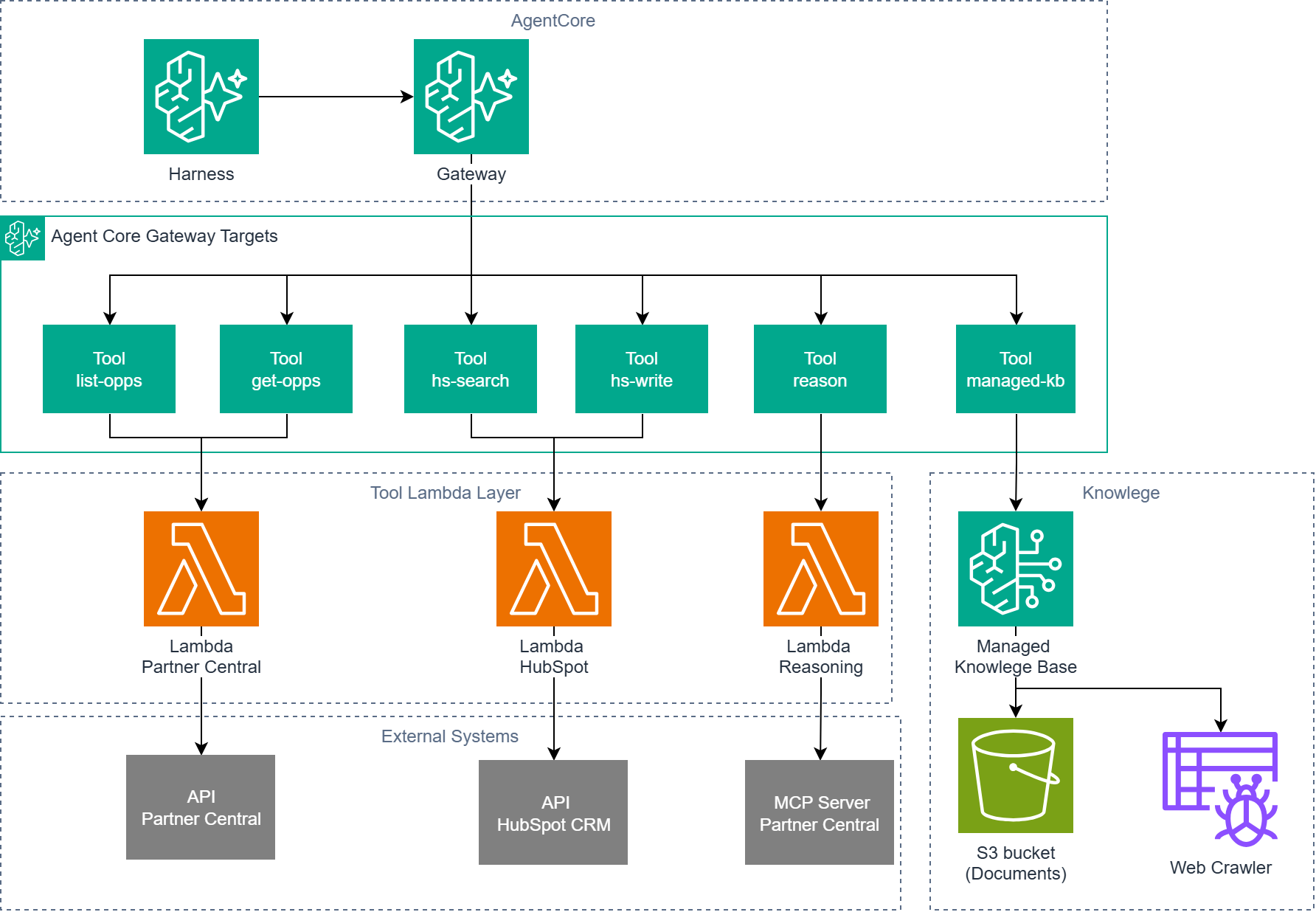
A Gateway in the AgentCore console is a short form: a name, a protocol type, an authorizer type, an execution role. This project's only Gateway is partner-growth-agent-gateway, with protocol_type = "MCP" and authorizer_type = "AWS_IAM" (the other option is CUSTOM_JWT). Those two values carry most of the design. The MCP protocol type means the Gateway presents itself to the harness as a standard MCP server: the harness enumerates tools with tools/list and invokes them with tools/call. The IAM authorizer type means this endpoint has no end-user-facing authentication at all. Its only caller is the harness, signing every request with its execution role's SigV4 credentials through the Gateway tool block described in article 1 and opened in full below. End users never touch this endpoint; they authenticate against Cognito at a separate frontend application. Two authentication planes, kept apart on purpose: humans at the API boundary, one IAM principal at the tool boundary.
In the automated build, the Gateway resource is correspondingly small:
resource "aws_bedrockagentcore_gateway" "agent" { name = "partner-growth-agent-gateway" role_arn = aws_iam_role.pc_gateway.arn authorizer_type = "AWS_IAM" protocol_type = "MCP" depends_on = [aws_iam_role_policy.pc_gateway_read_policy] policy_engine_configuration { arn = aws_bedrockagentcore_policy_engine.pc.policy_engine_arn mode = "ENFORCE" }}The policy_engine_configuration block attaches the next article's Cedar engine in ENFORCE mode. Note what is absent: no JWT issuer, no allowed clients, no OAuth anything.
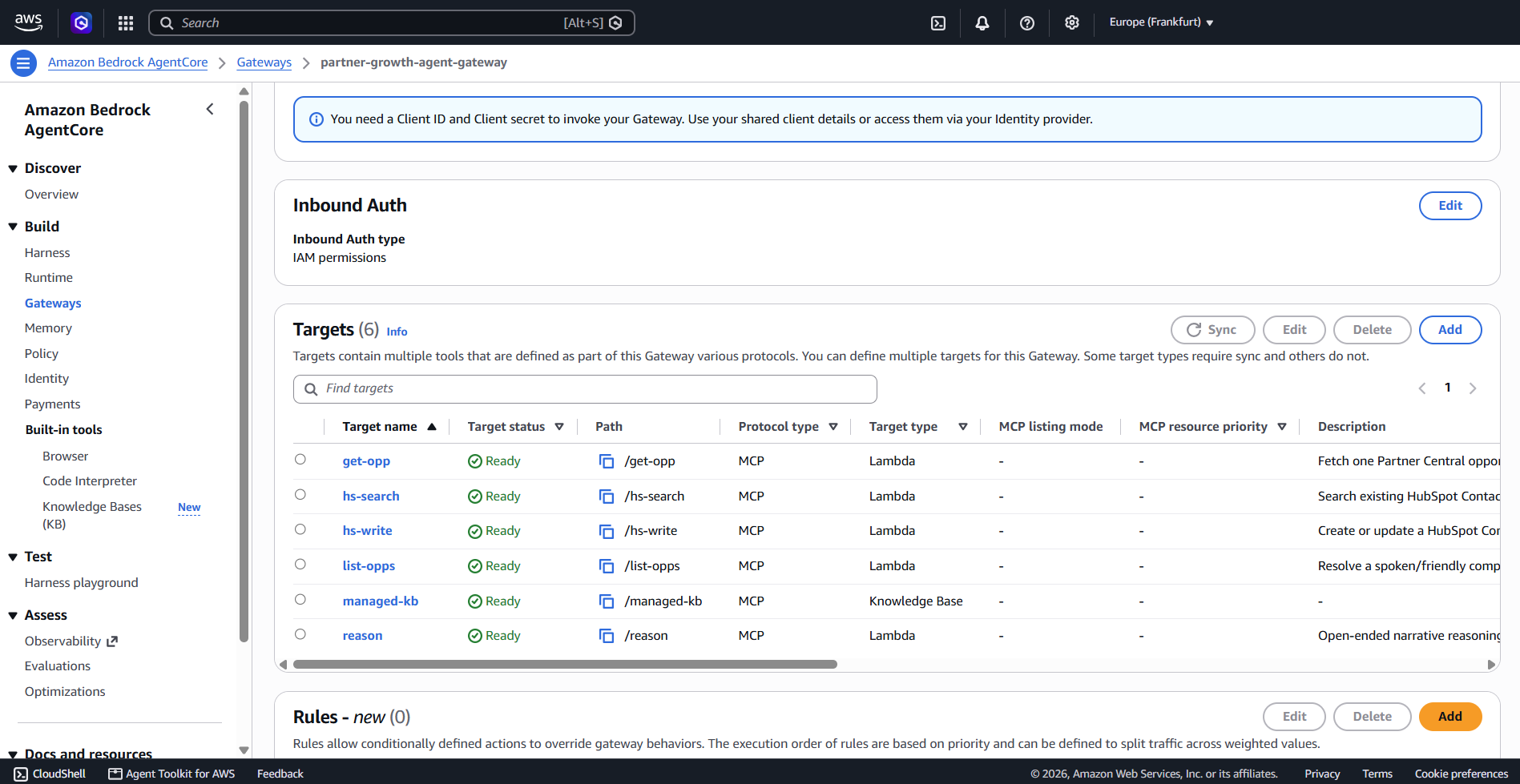
Behind that one endpoint sit the six targets:
| Target | Backend | Tool the model sees |
|---|---|---|
list-opps | Partner Central Lambda (Python 3.13) | list_matching_opportunities |
get-opp | Partner Central Lambda | get_opportunity |
reason | Reasoning Lambda | reason_about |
hs-search | HubSpot Lambda | search_contact |
hs-write | HubSpot Lambda | upsert_contact |
managed-kb | Knowledge Base connector | Retrieve, AgenticRetrieveStream |
Six targets carry seven tools, because managed-kb exposes two retrieval tools and the other five expose one each. The one-tool-per-target shape follows the provider: the provider docs I checked at build time model exactly one inline_payload tool schema per target, so the two Partner Central opportunity tools became two targets on the same Gateway rather than one target holding two schemas.
Two more things about that table before we go deeper into the sections. Every target name is terse because each one gets qualified into an allowed_tools glob that AWS caps at 64 characters, and the original descriptive names blew the cap the moment they were qualified. The managed-kb target is configured differently from its five neighbors. In the console it is an ordinary connector target on the same Gateway. In the automated build it is a terraform_data resource running local-exec, because neither the hashicorp/aws nor the hashicorp/awscc provider models a Gateway connector target yet. A console reader never sees this gap; it exists only on the automation path. Article 6 covers the knowledge base behind it.
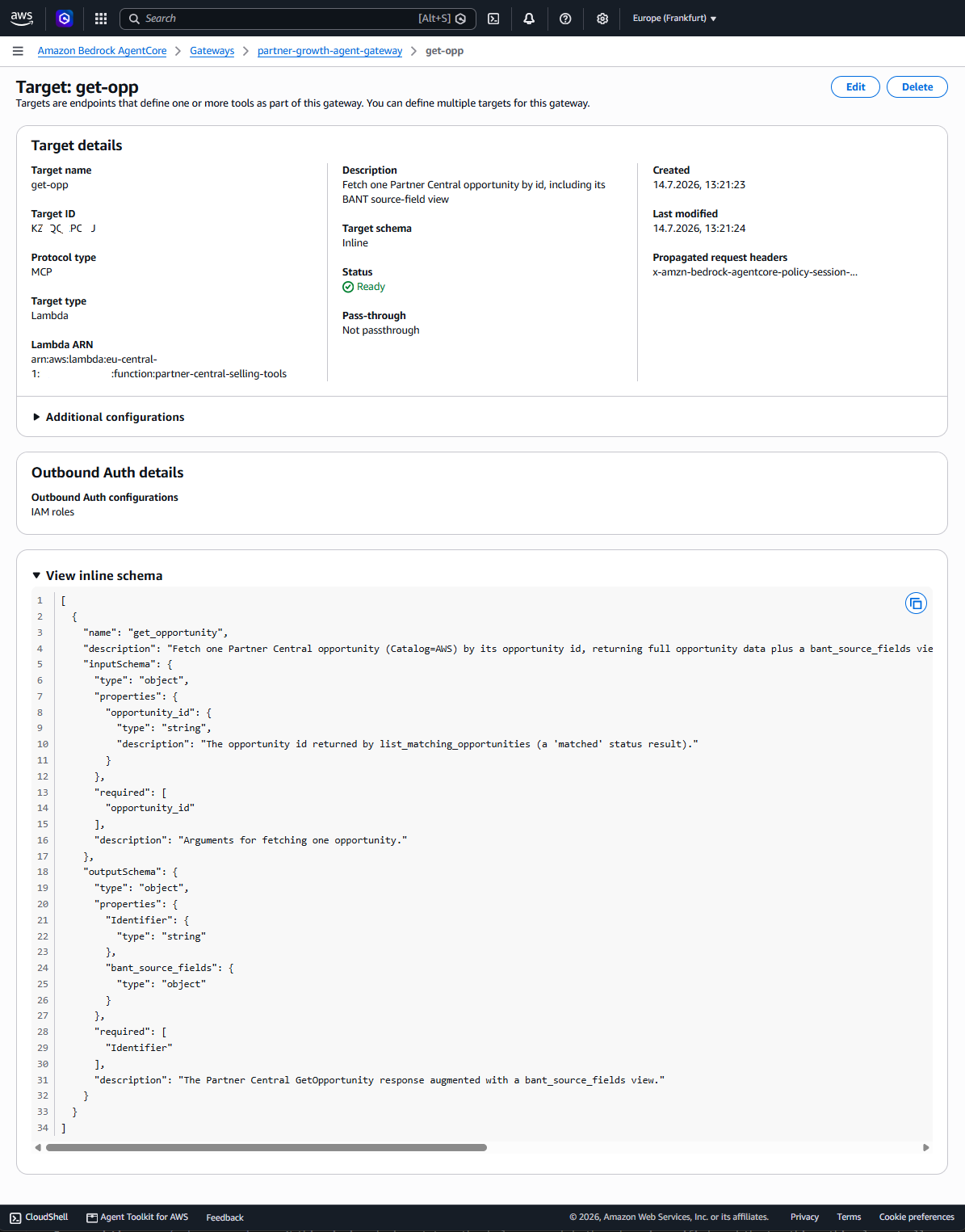
Creating a Lambda target takes five values, console or code: a target name, a description, the Lambda function ARN, a credential provider and a tool schema. Meaning the tool's name, a description the model will read and typed input and output properties. The Terraform for the get-opp target, condensed to the parts that matter (next article's Cedar guard references exactly this target):
resource "aws_bedrockagentcore_gateway_target" "get_opportunity" { name = "get-opp" gateway_identifier = aws_bedrockagentcore_gateway.agent.gateway_id description = "Fetch one Partner Central opportunity by id, including its BANT source-field view" credential_provider_configuration { gateway_iam_role {} } target_configuration { mcp { lambda { lambda_arn = aws_lambda_function.partnercentral.arn tool_schema { inline_payload { name = "get_opportunity" input_schema { type = "object" property { name = "opportunity_id" type = "string" description = "The opportunity id returned by list_matching_opportunities (a 'matched' status result)." required = true } } output_schema { type = "object" property { name = "Identifier" type = "string" required = true } property { name = "bant_source_fields" type = "object" } } } } } } }}I condensed one field away that deserves a sentence: the tool's description string in the full version carries part of the behavior contract, telling the model that any missing BANT (budget, authority, need, timeline) field renders the literal phrase "Not stated in opportunity data" rather than a guess. The model reads schema descriptions like documentation. A tool description is configuration and prompt at the same time and it lives here in the target. The contract is stated at both layers and in the live BANT round-trip the model followed the prompt's copy.
Why Lambda targets, when both external systems ship MCP servers?
The table above should raise a question. HubSpot ships a remote MCP server. AWS Partner Central ships a remote MCP server. AgentCore Gateway supports MCP-server targets. So why is every target in this project a Lambda? Two separate reasons, each sufficient on its own and all three generalize to other builds.
Reason one is HubSpot's auth model. HubSpot's MCP server at mcp.hubspot.com is real and speaks standard Streamable HTTP, but it mandates OAuth Authorization Code with PKCE [1]. On the AgentCore side, that flow would run through AgentCore Identity as a custom OAuth2 credential provider and at build time that path was blocked by an open bug in the AgentCore Python SDK for exactly this case, aws/bedrock-agentcore-sdk-python issue #158, still open at the time of writing in August 2026 [2].
Reason two is Partner Central's transport. Partner Central's MCP server lives at https://partnercentral-agents-mcp.us-east-1.api.aws/mcp, signed with SigV4 for service name partnercentral-agents-mcp in us-east-1 (one of the two regions its endpoint is published in [3]). While the MCP exposes only the two tools sendMessage and getSession, the conversation is handled by a session ID insight the tool argument [4]. That mechanism does not match the session-ID handshake the AgentCore Gateway's MCP-server target type performs. This is a transport mismatch, not a policy choice; no configuration bridges it. The solution is a Lambda target and the Lambda uses botocore's AWSRequest. The Gateway's role in this hop is routing only. One hop, no protocol translation in the middle.
A reader who has followed the series closely might propose a third path: skip the Gateway for Partner Central and use the harness's own remote_mcp tool type, which connects a harness directly to any MCP endpoint by URL, no Gateway involved [6]. I checked that too. Its configuration is a URL plus an optional map of sensitive headers and its documented auth options are exactly three: no auth, a static bearer-token header or a header value resolved from an AgentCore Identity API-key credential provider [6]. There is no SigV4 signing option. Partner Central's endpoint requires a cross-account IAM role and SigV4-signed requests, which remote_mcp structurally cannot produce, whatever the transport looks like. For a third-party MCP server that authenticates with a plain API-key header, remote_mcp is a legitimate and much shorter path; this project just does not have one of those.
Where all of this lands: every target on this Gateway is a Lambda or the managed KB connector and the project contains no OAuth configuration and no AgentCore Identity resource anywhere.
The allowed_tools glob syntax
For a reader new to MCP: tools/list is the JSON-RPC method an MCP client calls to enumerate a server's tools before invoking any of them. The harness performs that discovery against the Gateway, then filters the result through allowed_tools before the model ever sees a tool schema. A tool that survives the filter has its schema attached to the model's request. A tool that does not is invisible.
Which is why the failure mode, when the filter matches nothing, is so quiet. After every execution-role IAM gap from article 3 was fixed, the harness deployed cleanly and the chat looked alive. Asked about an opportunity, the model announced it was calling list_matching_opportunities, printed a plausible invocation with a parameter named company_name and summarized results it had invented. The real tool's only parameter is spoken_name. The Lambda's CloudWatch log group recorded zero invocations. There was no error anywhere, because from the model's point of view nothing was wrong: it had been asked about opportunities, given no tools and produced its best imitation of an agent at work.
I tried several plausible ways. Bare tool names. The Gateway's namespaced MCP names in the <target>___<tool> form, which I confirmed by making a direct SigV4-signed tools/list call against the Gateway's MCP endpoint. An explicit empty list. A freshly recreated harness with the field never set at all. GetHarness echoed back allowedTools: [] in every case. The final answer: Converse input token counts were byte-identical across every attempt (a constant 411 tokens per request). Tool schemas are part of the model's input. If any schema had been attached, that number would have moved.
The mechanism is documented on the AgentCore developer guide's "Tools" page, not in the Terraform provider docs, which do not describe the pattern at all [6]. allowedTools entries are glob patterns with a small grammar: @server, @server/tool, @server/glob, @*/tool [6]. A bare name such as shell only ever matches a builtin tool (shell, file_operations). Anything discovered through a Gateway or MCP server requires the @ form, where server is the name of the harness's own tool block and the tool is the Gateway's namespaced name. For this project that is @pc/get-opp___get_opportunity: pc from the harness tool block, get-opp___get_opportunity from the Gateway's own tools/list.
I applied the corrected globs and the very next invocation produced a real contentBlockStart.start.toolUse block with stopReason: "tool_use" and the correct spoken_name argument. Converse input tokens jumped above 411.
One constraint remained. AWS caps each glob string at 64 characters, rejecting longer ones with a ValidationException. The project's original names were individually reasonable: a tool block named partner_central_opportunities, targets named list-matching-opportunities and get-opportunity. Qualified, the listing tool's glob would have run to 88 characters. Everything got shortened to fit (pc, list-opps, get-opp), and every target added since was named short from day one.
The declared configuration as shipped:
tool { type = "agentcore_gateway" name = "pc" config { agentcore_gateway { gateway_arn = aws_bedrockagentcore_gateway.agent.gateway_arn outbound_auth { aws_iam = true } } }}allowed_tools = [ "@pc/list-opps___list_matching_opportunities", "@pc/get-opp___get_opportunity", "@pc/reason___reason_about", "@pc/managed-kb___Retrieve", "@pc/managed-kb___AgenticRetrieveStream", "@pc/hs-search___search_contact", "@pc/hs-write___upsert_contact",]The two knowledge-base tools live under the same @pc/ prefix as everything else. The managed-kb connector target hangs off the same Gateway and the same tool block, so a separate @kb/... prefix would silently match zero tools, which is the exact trap this section exists to document.
The Lambda input envelope
The Lambda's log group finally showed invocations. Every one of them failed with ValueError: Unknown tool name: None. Since I wrote the initial lambda handler before fixing the schema, I could not check if the configuration was correct. Well every piece was wrong.
The real contract, per the developer guide's Lambda input-format page [7]: event is the flat map of the tool's inputSchema properties, directly, with no wrapper key of any kind. A get_opportunity call arrives as {"opportunity_id": "..."} and nothing else. The tool name is not in event at all. It travels in the Lambda context object, at context.client_context.custom['bedrockAgentCoreToolName'], formatted as <target>___<tool> and the developer guide warns that the prefix "will need to be manually stripped" [7]. The corrected dispatch, which is the entire integration surface between the Gateway and this Lambda:
_TOOL_NAME_DELIMITER = "___"def _extract_tool_name(context) -> str: raw_tool_name = context.client_context.custom["bedrockAgentCoreToolName"] if _TOOL_NAME_DELIMITER in raw_tool_name: return raw_tool_name.split(_TOOL_NAME_DELIMITER, 1)[1] return raw_tool_namedef _json_safe(value): if isinstance(value, datetime.date): return value.isoformat() if isinstance(value, dict): return {k: _json_safe(v) for k, v in value.items()} if isinstance(value, list): return [_json_safe(v) for v in value] return valuedef lambda_handler(event, context): tool_name = _extract_tool_name(context) arguments = event or {} if tool_name == "list_matching_opportunities": result = list_matching_opportunities(arguments.get("spoken_name")) elif tool_name == "get_opportunity": result = get_opportunity(arguments.get("opportunity_id")) else: raise ValueError(f"Unknown tool name: {tool_name!r}") return _json_safe(result)_json_safe in that snippet is this section's live-data lesson. list_matching_opportunities worked end to end immediately. get_opportunity did not: Runtime.MarshalError: Unable to marshal response: Object of type datetime is not JSON serializable. boto3 deserializes Partner Central's timestamp fields, LifeCycle.TargetCloseDate and LastModifiedDate among them, into native Python datetime objects, and the Lambda runtime cannot JSON-marshal those in a return value. The unit-test fixtures had used plain date strings, so the suite was green the whole time. The fix is the recursive converter above, applied to the entire return value so it catches a timestamp wherever one sits, plus a regression test that injects real date and datetime objects into the mocked response and asserts json.dumps round-trips. Fixtures built from what you assume an API returns will not catch this bug class. One live call against real data did.
One porting note: _json_safe was not copied into the reasoning Lambda. That Lambda parses raw HTTP JSON with json.loads, so its values are already strings.
The IAM the Gateway itself needed
The previous article told this story for the harness's execution role: every new capability surfaced its IAM needs as a live failure. The Gateway repeats the pattern with its own execution role and in this project it did so the moment the Cedar policy engine was associated with it.
The association itself is one console action or the policy_engine_configuration block shown in the first section. What it triggered was a chain of five service-side AccessDenied failures on UpdateGateway, one per apply, each naming a permission the Gateway's execution role lacked:
bedrock-agentcore:GetPolicyEngineon the policy engine's ARN. The error reads "Access denied while calling GetPolicyEngine on Policy Engine ... with Gateway role": the Gateway role must be able to read the engine it is being associated with.bedrock-agentcore:AuthorizeActionon the policy engine's ARN. Reading the engine's metadata is not enough; the role must also be allowed to invoke its authorization decision at call time.bedrock-agentcore:AuthorizeActionagain, this time scoped to the Gateway's own ARN. Cedar's evaluation runs against the Gateway resource, so the same action needs a second grant on a second ARN type.bedrock-agentcore:PartiallyAuthorizeActionson the policy engine's ARN.UpdateGateway's own validation step, visible in the failure as an assumed role carrying the suffixGenesisPolicyEngineCheck, calls this as a distinct action thatAuthorizeActiondoes not imply.bedrock-agentcore:PartiallyAuthorizeActionson the Gateway's own ARN, completing the same two-ARN pattern as step 3.
Three actions, two ARN types, five grants demanded live. GetPolicyEngine was the only action never demanded against the Gateway's own ARN, which is why the deployed policy carries five action-to-ARN grants, packed into two IAM statements. If you are planning to build the same, grant the full permissions up front anyway and skip the discovery loop; each of these cost one apply-fail-diagnose cycle and none of them is visible before the live UpdateGateway call.
Two implementation notes from the automated path. The gateway-scoped statements use an ARN pattern anchored to the statically known Gateway name with a wildcard suffix, arn:aws:bedrock-agentcore:eu-central-1:<account>:gateway/partner-growth-agent-gateway-*, rather than the literal ID captured from one historical apply. The pattern is knowable at plan time and survives a teardown and recreate; a hardcoded suffix does not.
Transferable patterns
Five things from this Gateway generalize beyond this demo to any AgentCore build.
- The 64-character
allowed_toolscap is a naming rule. Pick short Gateway target names before you know how many prefixes will stack on top of them. A name that fits comfortably on its own can blow the cap once qualified with the tool-block prefix and the tool-name suffix and renaming a target after a demo depends on it is far more disruptive than naming it short from the start. - Bare names match builtins only. Any Gateway or MCP tool needs the
@<block>/<target>___<tool>glob form, documented on the developer guide's "Tools" page and absent from the Terraform provider docs. If your model narrates tool calls instead of making them, check this before anything else, and check it with token counts, not with prose. - Wrap an external MCP server in a Lambda target when its transport or auth does not match the Gateway. HubSpot's OAuth-plus-PKCE mandate and Partner Central's
sendMessage/getSessionhandshake are two different mismatches with the same fix: a Lambda that speaks the external system's real protocol on one side and exposes an ordinaryinline_payloadschema on the other. - Marshal datetimes before live data arrives. Any Lambda tool wrapping a boto3 client needs a recursive datetime-to-ISO conversion on its whole return value, because test fixtures written as plain strings cannot surface the
Runtime.MarshalErrorthat real responses produce. - Verify tool exposure with a direct SigV4
tools/listprobe. Bypassing the model and the harness to ask the Gateway what it exposes separates "the Gateway does not expose this tool" from "the model cannot see it" in one request. It is faster and more certain than debugging through a model's tool-selection behavior.
If you are reproducing this
Three notes for a reader standing this subsystem up. All three come from failures described above.
First, before associating a policy engine with a Gateway, put the policy-engine permissions on the Gateway's execution role up front: GetPolicyEngine, AuthorizeAction, and PartiallyAuthorizeActions, scoped to the policy engine's ARN and to the Gateway's own ARN pattern.
Second, keep every Gateway target name short before it gets qualified into an allowed_tools glob. The budget is 64 characters for @<block>/<target>___<tool> in total. Spend them on the tool name, which the model reads, not on the target name, which only routing sees.
Third, before writing any code against an external MCP server, check its session handshake and its auth model against the Gateway's supported target types and the outbound-auth matrix. Both of this project's mismatches were visible in public documentation before any Lambda code existed. A mismatch found after the Lambda is built means rewriting the integration, not just the code around it.
I hope this article was useful for you. I would love to receive feedback on what you liked and disliked, so that I can improve any future article.
Sources
[1] HubSpot developer documentation for the HubSpot MCP server (mcp.hubspot.com): Streamable HTTP transport and the OAuth Authorization Code + PKCE requirement. https://developers.hubspot.com/docs/apps/developer-platform/build-apps/integrate-with-the-remote-hubspot-mcp-server
[2] GitHub, aws/bedrock-agentcore-sdk-python issue #158: open AgentCore Identity bug for custom OAuth2 providers. https://github.com/aws/bedrock-agentcore-sdk-python/issues/158
[3] AWS Partner Central developer guide, MCP configuration reference: endpoint URL, SigV4 service name partnercentral-agents-mcp, us-east-1. https://docs.aws.amazon.com/partner-central/latest/developer-guide/mcp-configuration-reference.html
[4] AWS Partner Central developer guide, MCP tools reference: the single tools/call method carrying sendMessage/getSession, and the error-handling section documenting -32004 LIMIT_EXCEEDED. https://docs.aws.amazon.com/partner-central/latest/developer-guide/mcp-tools-reference.html
[5] Amazon Bedrock AgentCore developer guide: Gateway target types and the outbound-auth support matrix (Lambda targets support the Gateway service role only; API key and OAuth variants unsupported for that target type). https://docs.aws.amazon.com/bedrock-agentcore/latest/devguide/gateway-outbound-auth.html
[6] Amazon Bedrock AgentCore developer guide, "Tools": the allowedTools glob patterns (@server, @server/tool, @server/glob, @*/tool), bare names matching builtin tools only, and the remote_mcp tool type's URL-plus-headers configuration. https://docs.aws.amazon.com/bedrock-agentcore/latest/devguide/harness-tools.html
[7] Amazon Bedrock AgentCore developer guide, Lambda function input format for Gateway targets: event as the flat inputSchema property map, and the tool name in context.client_context.custom['bedrockAgentCoreToolName'] with the target prefix to strip. https://docs.aws.amazon.com/bedrock-agentcore/latest/devguide/gateway-add-target-lambda.html