From Company Name to CRM Record: One AgentCore Conversation, End to End
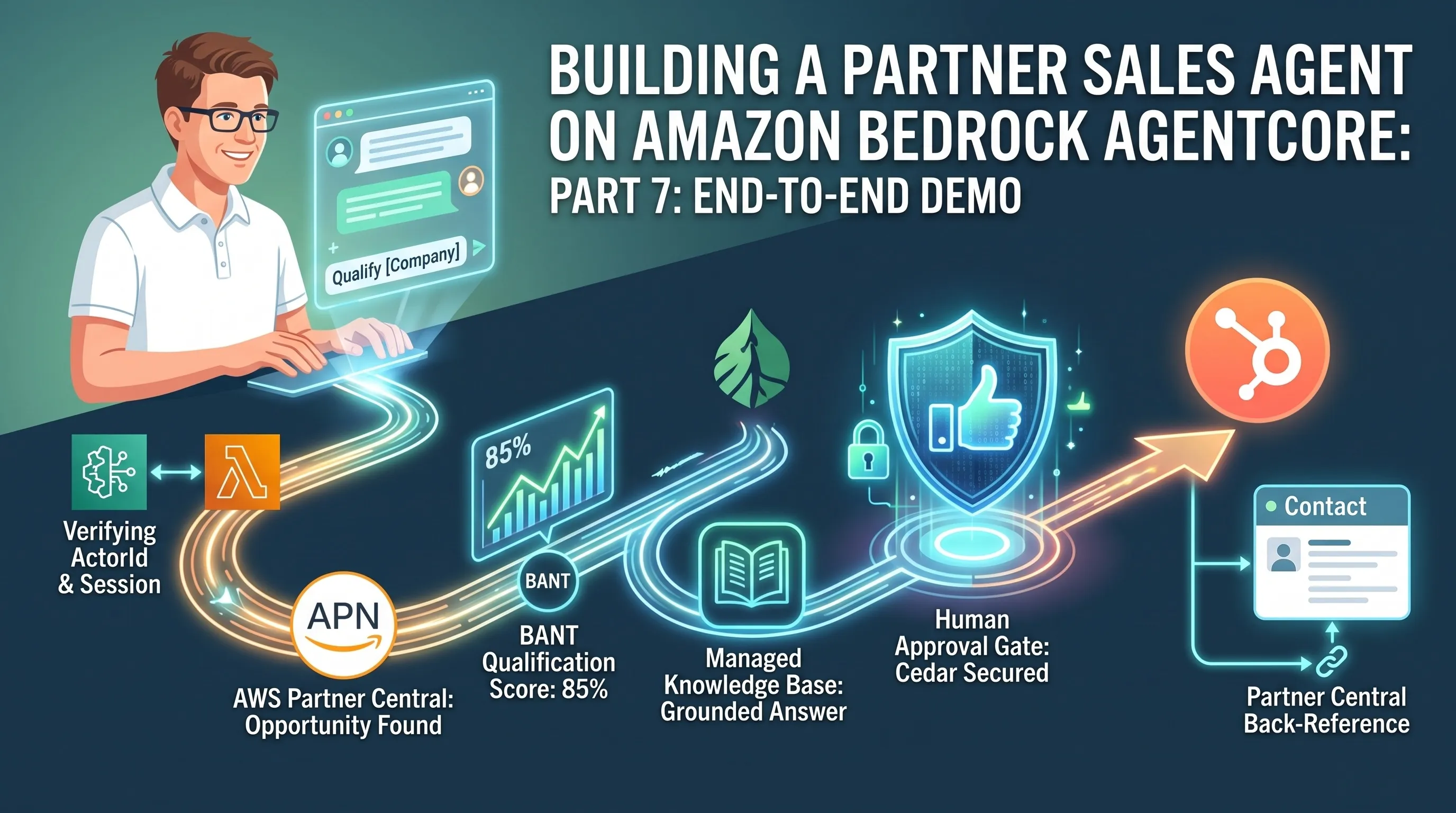
TL;DR: I ran this whole system live, from a company name typed into the chat box to a HubSpot Contact carrying a AWS Partner Central back-reference, and narrate exactly what moved: the wire contract, the actorId-based identity isolation, the BANT qualification, the knowledge base answer, the conversational approval gate backed by a Cedar guard, and the final CRM write.
Part 7 of the series "Building a Partner Sales Agent on Amazon Bedrock AgentCore", built around one real project: a conversational agent that connects HubSpot CRM and AWS Partner Central for an AWS Partner's sales team. This is the closing article. The first six built the system one block at a time; this one runs it live, from a company name typed into a chat box to a HubSpot Contact carrying a Partner Central back-reference. It also carries the series' final accounting: what worked on the first try, what needed a live fix, and what stays an accepted, disclosed limit.
Table of Content
- Article 1: Two Systems, One Sales Motion: An AWS Partner Agent on Amazon AgentCore Harness
- Article 2: Why I Didn't Write My Own Agent Loop: The Case for AgentCore Harness
- Article 3: Configuring AgentCore Runtime: Session Lifecycle, Container Backing, Memory
- Article 4: One Gateway, Six Tools: AgentCore Gateway as Your Agent's Only Way Out
- Article 5: A Deterministic Backstop for Your Agent: AgentCore Policy and Cedar
- Article 6: Grounding an Agent Without a Vector Database: AgentCore Managed Knowledge Base
- Article 7: From Company Name to CRM Record: One AgentCore Conversation, End to End
Article 1 opened this series with a promise: one chat conversation carries the whole motion. A sales rep types a company name, the agent finds the matching Partner Central opportunity, qualifies it against BANT (budget, authority, need, timeline) criteria, answers a competency question from the knowledge base, proposes a HubSpot Contact, waits for an explicit human approval, and writes the Contact with a back-reference to the opportunity it came from. Every building block that conversation touches has had its own article: the managed agent loop, the runtime configuration, the Gateway and its six targets, the Cedar policy engine behind the write path, and the Managed Knowledge Base. While each component on its own worked great, there was some struggle in the final integration.
So this article explains one real conversation through the deployed system and shows what actually moves: the wire contract at the front door, the tool calls, the SSE frames, the approval exchange, and the Contact that lands in HubSpot at the end. Where the walkthrough passes a spot that bit me during the build, I stop and show the bite.
Front door: getting a request from the browser to the harness
Before the model sees a single word, some infrastructure pieces need to be set up first. The browser loads the static chat UI from CloudFront, signed in against Cognito, and now sends the turn as one HTTP call.
POSTto the API Gateway invoke URL withContent-Type: application/jsonand the body{"prompt": "<text>", "sessionId": "<uuid, optional>"}.- The
Authorizationheader carries the raw Cognito ID token with noBearerprefix. API Gateway's nativeCOGNITO_USER_POOLSauthorizer expects the bare JWT, not an OAuth-style wrapper. - The first SSE
data:frame the client ever receives is always{"sessionId": "<resolved-uuid>"}, echoed before any model content, so the client can persist the id even before the first token arrives.
An authenticated call over this contract returned between 9 and 17 discrete data: frames per response, printing progressively rather than landing as one blocking burst, which shows that it’s live streaming and not a buffered response.
Behind the API Gateway Cognito authorizer sits the streaming relay, the one Lambda in the project that breaks its own Python rule and runs on nodejs24.x, because Lambda response streaming exists only on Node-managed runtimes [1]; its integration points at the function's response_streaming_invoke_arn with response_transfer_mode = "STREAM" [2], on a 90-second timeout.
The relay's real job, though, is identity. It derives two identifiers per request, and they carry very different weight:
// lambda/streaming_relay/handler-logic.mjs (condensed)export function deriveActorId(event) { const sub = event?.requestContext?.authorizer?.claims?.sub; if (typeof sub !== "string" || sub.length === 0) { throw new Error( "deriveActorId: event.requestContext.authorizer.claims.sub is missing " + "or empty -- refusing to invoke the harness without a verified actorId." ); } return sub;}export function resolveSessionId(body) { const sessionId = body?.sessionId; if (typeof sessionId === "string" && sessionId.length > 0) { return sessionId; } return randomUUID();}actorId comes from the verified JWT sub claim and from nowhere else. Not the request body, not a header, and if the claim is somehow absent the function throws before any harness call is made. sessionId is the client's value if present, otherwise a fresh UUID. The distinction matters because the two ids do different jobs. sessionId groups events into one conversation for the history and recall UI, and it carries no security weight of its own. actorId is what AgentCore Memory actually partitions on. A reader who combines the two will assume session-id uniqueness does the isolation work, and it does not, as the next section shows with a deliberately collided id.
As described in the first article: AgentCore Harness ships a native inbound JWT authorizer that would have let the browser call the harness directly, and it lost because nothing in that path binds a verified claim to actorId [3]. Im simple words: I wanted to protect the Harness invokation and validate the JWT Token before the harness invocation. This also allowed me to keep authentication logic outside the harness code.
The lambda relay carries one more detail: its IAM grant
# infra/lambda_streaming_relay.tf (condensed) -- the relay's only AgentCore grantdata "aws_iam_policy_document" "streaming_relay_invoke_harness" { statement { effect = "Allow" actions = [ "bedrock-agentcore:InvokeHarness", "bedrock-agentcore:InvokeAgentRuntime", ] resources = [ aws_bedrockagentcore_harness.agent.arn, # harness/<id> "${aws_bedrockagentcore_harness.agent.arn}/harness-endpoint/*", # safe superset ] }}Two IAM actions with confusingly similar names exist in the same bedrock-agentcore namespace and must never appear here: InvokeAgentRuntimeCommand and InvokeAgentRuntimeCommandShell [3]. Those are direct command execution and an interactive shell against the runtime, and both bypass the model and its tool allowlist entirely. They are unrelated to the safe InvokeHarness/InvokeAgentRuntime pair a relay needs, neither of which carries a Command suffix. The resource list is a deliberate superset, both the bare harness ARN and its /harness-endpoint/* sub-resource.
Same-session identity, stated precisely
You can test the session isolation easily with the following steps I tested:
-
Create two Congnito users.
-
User A told the agent a memorable fact ("my favorite color is yellow") in session
S. -
User B then replayed the exact same
sessionIdstringSand asked the agent to recall it. User B got "I have no memory of that." -
A follow-up from user A on the same session
Srecalled the color correctly.
That is a clearer result than "different sessions stay separate": the same literal session id, queried by two different actors, returns each actor's own partition and never the other's. The partitioning happens on the verified identity, before the session id is requested at all.
The conversation: from a company name to a qualified opportunity
Here is the flow with every building block from articles 3 through 6 in the order the demo exercises them.
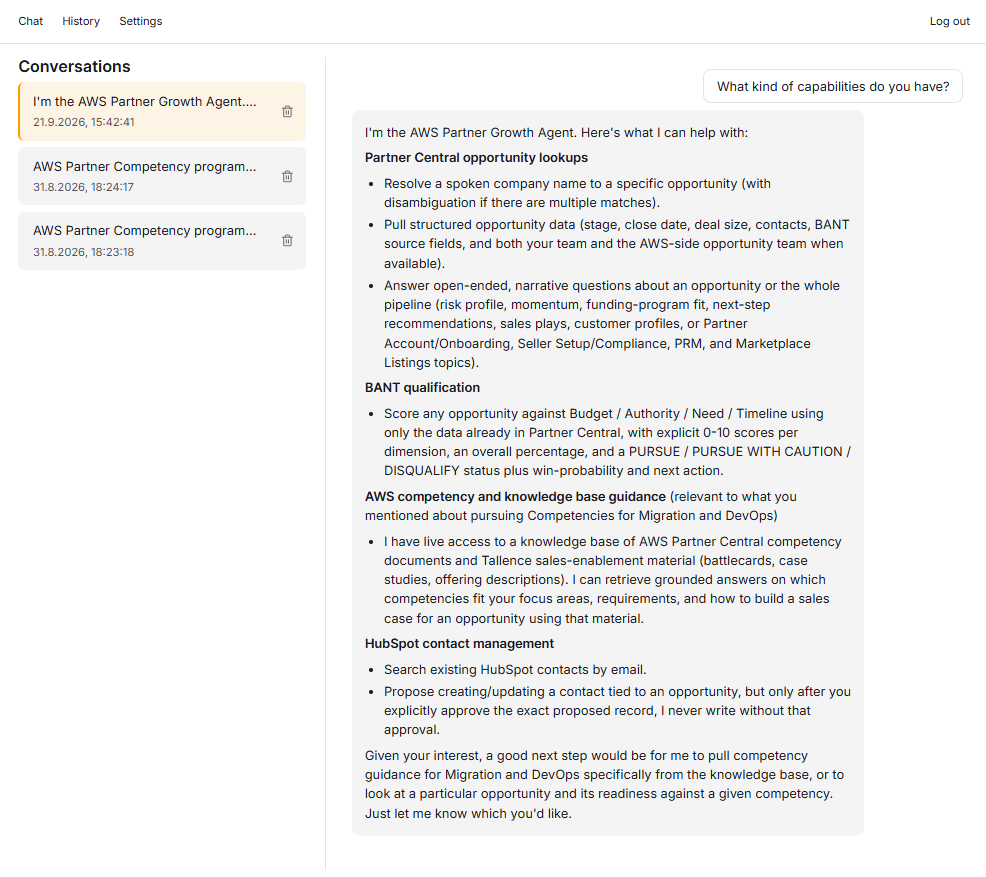
The sales rep opens with a company name: "Qualify [company] against BANT criteria." The agent's first call is list_matching_opportunities, which resolves a spoken, friendly company name to an opportunity in the APN Portal. If there are multiple opportunities with the same name, the tool returns a list of opportunities and the Sales rep needs to choose the candidate.
Since the list call dows not provide enough information to tell the candidates apart, a GetOpportunity is made per opportunity in the list. This provides project tile, contacts, stage, target close gate and expected spend.
With the opportunity identified, get_opportunity pulls the full record plus a bant_source_fields view in which any missing field renders as the literal string "Not stated in opportunity data". The qualification the model produces has to distinguish evidence from absence, and that contract lives in the tool's output rather than in the model's discretion. One safeguard sits behind this call too: a Cedar rule at the AgentCore Gateway boundary forbids any get_opportunity call missing an opportunity_id, independent of whatever the model narrates.
The BANT answer itself follows the system prompt's exact output format: each of the four BANT fields scored 0 to 10 with supporting evidence bullets, the sum out of 40 expressed as a percentage, a status of exactly PURSUE, PURSUE WITH CAUTION, or DISQUALIFY, then a win-probability estimate and a recommended next action.
Note, that I have build 2 ways to access the AWS Partner Central. Via Lambda and direkt API and MCP Server. The MCP Server, seen by the harness as reason_about tool should not be used in this case, because the response would not have the BANT source fields in the response. I restructured the prompt and reduced the violation rate from 33% to 11%.
Two more behaviors round out the qualification picture. An opportunity in a co-sell motion can carry two distinct account teams: the partner's own reps on the opportunity, and a separate AWS-side team (sales rep, account owner, partner development manager) that comes from a different API entirely, GetAwsOpportunitySummary. The tool merges those AWS-side fields into the same get_opportunity response, and the system prompt rule requires the agent to present the two teams as separately labeled groups, "Your team:" and "AWS team:", never one undifferentiated list of names. In the final live test against a real Co-Sell opportunity, the AWS-side team surfaced exactly that way. A sales rep asking "who owns this deal" gets an answer that matches what Partner Central actually shows.
And when the sales rep pivots to "what's our competency angle here?", the turn routes to the Managed Knowledge Base through AgenticRetrieveStream and the answer comes back grounded in the retrieved documents with its sources gathered in a single list at the end. Article 6 covers what feeds that index; in the conversation it is one more tool call.
The approval gate: proposing, then writing to HubSpot
The one write path in the whole system is hs-write___upsert_contact, and the mechanism guarding it is not the one I designed. The honest sequence matters more than the final mechanism, so here is the road not taken first.
The original design was a dedicated propose_hubspot_contact tool of the harness's inline_function type: the model calls it, the harness pauses, a human approves, execution resumes. Two separate wirings of that idea were built and both turned out to be non-viable, discovered only by live testing at the checkpoint. First, a Terraform-declared inline_function tool cannot be reached through any allowed_tools pattern once the harness has a restrictive allowlist. The documented pattern table covers *, plain names (which only ever match built-in tools), @builtin[/name], and @server[/tool] for Gateway and MCP tools. There is no pattern at all for the inline_function, browser, or code_interpreter tool types, so the declared tool never surfaced to the model. Second, passing a tools=[...] parameter at invoke time replaces the harness's entire configured toolset for that call rather than adding to it, which rules out invoke-time injection for any flow that needs the permanent tools and the pause in the same session.
What shipped is a consequence of both dead ends: there is no propose tool at all. The model, given only its permanently configured tools, searches HubSpot first, composes the full proposed Contact record in plain text (email, first name, last name, company, and the opportunity reference destined for the message field), and ends its turn with an approval question.
The signal that resolves the pause changed once after shipping, and the change earns a sentence of history. The first working version recognized exactly one literal string as approval, "APPROVED: proceed with the HubSpot write now.", plus a "NOT APPROVED" counterpart, and treated anything else, including "ok" and "sure", as noise. That worked, but it welded a HubSpot-specific phrase into the prompt and into every client. The current prompt generalizes the same contract into a tool-agnostic tag the model emits as the last thing in its proposal turn:
# infra/harness.tf, system prompt (condensed to the approval-signal rule)Rule 8c (the decision-request signal, generic and non-negotiable): Immediatelyafter presenting the full proposed record in plain text (Rule 8b) and askingthe presenter to approve it, emit EXACTLY one decision-request tag as the verylast thing in your turn, then end your turn:<decision_request>{"question": "<restate the yes/no question in one sentence>","options": ["Approve", "Decline"]}</decision_request>... Only treat the presenter's NEXT message as resolving this decision-requestif it is an EXACT, case-sensitive match for one of the option labels you justoffered (e.g. exactly "Approve" or exactly "Decline") -- any other reply(including something that merely sounds like agreement, e.g. "ok", "sure","yes go ahead") is neither; re-state the proposal and the tag again ratherthan guessing. NEVER call hs-write___upsert_contact withconfirmed_by_presenter=true except immediately after receiving the exact"Approve" reply for THIS exact proposal ... There is no session fast-path, ever.In the browser, that tag never renders as raw text; the frontend extracts it mid-stream and renders an Approve/Decline card, and clicking a button sends the exact label as the next user turn. Outside the browser, a small CLI script drives the identical two-turn exchange, which is also the cleanest way to see the mechanism's shape:
# scripts/approve_hubspot_write.py (condensed) -- the two-turn approval driverresponse = invoke_fn( harnessArn=harness_arn, runtimeSessionId=session_id, messages=[{"role": "user", "content": [{"text": args.prompt}]}],)proposal_events = list(response["stream"]) # a boto3 EventStream iterates onceproposal_text = extract_text(proposal_events)print(proposal_text) # the model's own proposed Contact recorddecision = parse_decision_request(proposal_text) # fail-closed: None on anything malformedfor index, option in enumerate(decision["options"], start=1): print(f" {index}) {option}") # 1) Approve 2) Declinechosen_label = decision["options"][int(input("Choose an option number: ")) - 1]followup = invoke_fn( harnessArn=harness_arn, runtimeSessionId=session_id, # the SAME session: turn two of one conversation messages=[{"role": "user", "content": [{"text": chosen_label}]}], # exact label, verbatim)A conversational gate enforced by a prompt would be a thin thing to stand alone, and it doesn't. The deterministic guard is the Cedar rule from article 5: any call to hs-write___upsert_contact whose input lacks confirmed_by_presenter, or carries it as anything but true, is forbidden at the Gateway boundary, regardless of what the model says it is doing.
One honest limit of that guard: it verifies the flag is present and set to true, not that a genuine human approval produced it. A model that attached confirmed_by_presenter=true without a real approval would pass. Cedar sees a single call's input, never the conversation that led to it, so genuine-consent verification stays at the prompt level as an accepted, documented residual.
Streaming it to the browser
I have to give more insights about the life token streaming between the browser and the harness:
One tool-using harness multiplexes three message cycles over the single HTTP response. Cycle one is the tool call: messageStart, the tool-use content blocks, messageStop with stopReason: "tool_use". Cycle two is the tool result coming back, closed by its own messageStop. Cycle three is the actual answer, the only cycle with text a user should see, streamed as contentBlockDelta frames and closed by messageStop with stopReason: "end_turn".
Landing in HubSpot, with a Partner Central back-reference
An approved write ends the conversation where the sales team already works. The Contact lands in HubSpot CRM with the core fields (email, first name, last name, company) mapped to HubSpot's own default properties, and the AWS Partner Central linkage written into the existing message property, a default free-text field this project reuses rather than creating a custom one. The text follows a fixed shape: "Primary contact on Partner Central opportunity <opportunity-id> (<company> / <reseller>, '<project title>', Partner Opportunity Identifier <partner-opp-id>)." A rep opening this Contact next quarter sees exactly which opportunity produced it, without leaving the CRM.
The surrounding experience: history and memory settings
Apart from the demo conversation, that are two more supporting pages in the demo application.
The History page lists a user's past conversations with a preview and timestamp, replays transcripts and offers deletion per row. Reading transcripts back out of AgentCore Memory took a bit. Event payloads wrap the display text one level deeper than the documented shape suggests, so the backend applies a second json.loads() to reach the actual message text. Events return newest-first, so the list must be re-sorted before replay or every conversation renders backwards.
Deletion is a bit more difficult. Hard-deleting a session's events works, but the session's empty shell never leaves the list_sessions response; I polled after deleting every event and the shell stayed, because no server-side API removes a session whose events are gone. The fix is a client-side filter in the Lambda, a cheap one-event existence check (session_has_events) per session. Deeper than that: three of the four Memory strategies (semantic, user preference, and episodic reflection) carry no session-lineage metadata at all, so deleting one conversation cannot cleanly delete only that conversation's learned facts. The only resolution is an actor-wide wipe and the confirm dialog states: deleting this conversation also clears facts and preferences the agent learned from the user's other conversations.
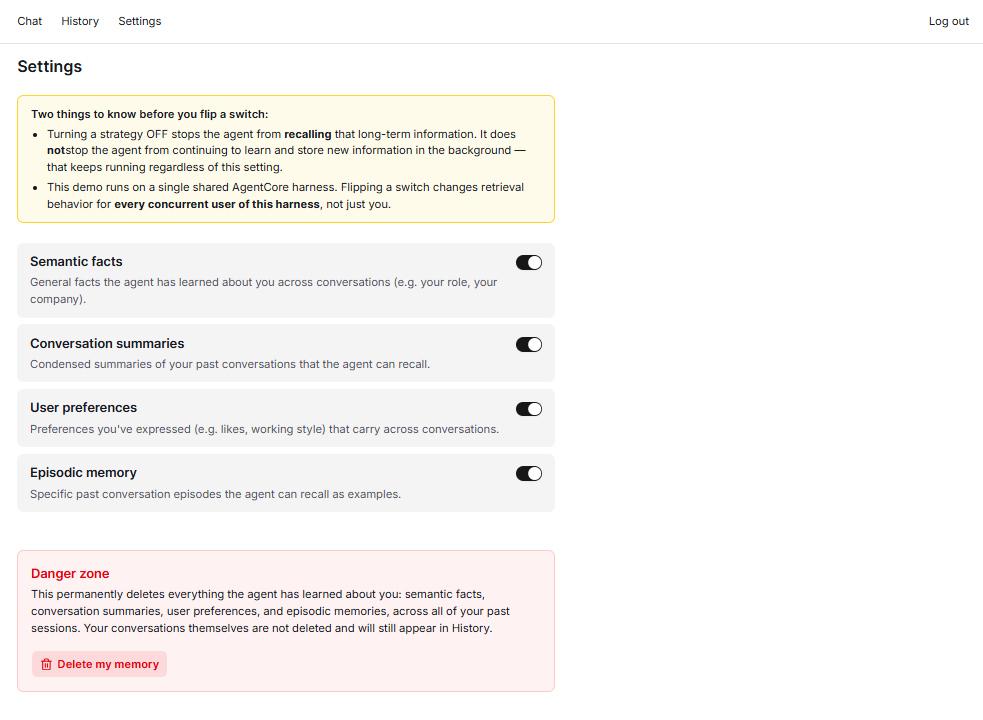
The Settings page is four labeled switches, one per memory strategy (semantic, summary, user preference, episodic). The page discloses two real limits. Flipping a strategy off suppresses retrieval only; background learning keeps running. The effect is harness-global, reaching every concurrent user of the shared demo harness, not just the person who flipped the switch, an accepted concession for a single-rep demo, stated rather than hidden. The toggle is not cosmetic: the live acceptance test flipped a strategy off, confirmed the agent no longer recalled that strategy's long-term context in the same conversation, flipped it back on, and confirmed recall returned on the next message, with the state surviving a page reload.
Transferable patterns
Seven articles produce a lot of project-specific detail. These four habits are the part I would carry into any AgentCore build, or any agent build at all.
- Derive
actorIdfrom the verified JWTsub, never from the request body. This is the actual isolation mechanism in this whole system. A client-supplied user identifier of any kind is a spoofable input; a claim from a token the server itself validated is not. - An SSE consumer must not break on the first
messageStopit sees. Any tool-using agent turn multiplexes multiple message cycles over one HTTP response. A streaming consumer written against a single-cycle mental model silently drops every tool-using turn's final answer, exactly the way this project's frontend once did, and passes every tool-free test while doing it. - Verify isolation with a real IDOR probe, not just UI absence. Confirming another user's data doesn't show up in the UI proves the UI filters correctly, and nothing else. Querying the read endpoint directly with a mismatched actor and session pair is the check that rules out a server-side leak, and doing it with a guaranteed-fresh session id is what makes the result unambiguous.
- Never grant
InvokeAgentRuntimeCommandorInvokeAgentRuntimeCommandShell. These two IAM actions bypass the model entirely for direct command execution and an interactive shell [3]. They are unrelated to the safeInvokeHarness/InvokeAgentRuntimepair a relay needs, and the time to design them out is when the policy is first written, not in a review months later.
What it actually took
It was not straightforward the happy path:
The messageStop bug silently swallowed the rendered answer of every tool-using turn, the exact turns this demo exists to show, until an instrumented capture of the raw stream found the loop breaking on the first of three message cycles. The approval gate that shipped was the third design, standing on two inline_function wirings that were built, tested live, and found unreachable or self-defeating. The Cedar guard on the one write path does exactly what it can and no more: it deterministically rejects any write not flagged true, and it cannot verify that a human produced the flag. And conversation deletion carries a disclosed actor-wide memory wipe, because three of the four Memory strategies have no per-session lineage to delete along.
The point, stated directly: this system is built entirely from managed services with no self-hosted inference and no custom orchestration loop, and it still needed live debugging, a rejected design, and an accepted, disclosed limitation to reach a working demo.
That is also where this series ends. Article 1 promised that one conversation could carry the whole motion, and the conversation this article walked is that promise kept: a company name in, a qualified opportunity, a grounded competency answer, an explicit human approval, and a HubSpot Contact out, with the back-reference that keeps the two systems of record honest with each other.
I hope this article was useful for you. I would love to receive feedback on what you liked and disliked, so that I can improve any future article.
Sources
[1] AWS Lambda developer guide: response streaming (streamifyResponse) is available on Node.js managed runtimes only. https://docs.aws.amazon.com/lambda/latest/dg/configuration-response-streaming.html
[2] Amazon API Gateway documentation: response streaming for Lambda proxy integrations, including the response-streaming invoke ARN and the STREAM response transfer mode. https://docs.aws.amazon.com/apigateway/latest/developerguide/response-transfer-mode.html; https://docs.aws.amazon.com/apigateway/latest/developerguide/response-transfer-mode-lambda.html
[3] AWS Bedrock AgentCore developer guide and IAM action reference: the InvokeAgentRuntime data-plane action, the inbound JWT authorizer, and the distinct InvokeAgentRuntimeCommand / InvokeAgentRuntimeCommandShell actions that execute commands without passing through the model. https://docs.aws.amazon.com/bedrock-agentcore/latest/APIReference/API_InvokeAgentRuntime.html; https://docs.aws.amazon.com/bedrock-agentcore/latest/devguide/inbound-jwt-authorizer.html; https://docs.aws.amazon.com/service-authorization/latest/reference/list_bedrock-agentcore.html
[4] Vercel AI SDK documentation: the useChat transport and its UIMessageChunk stream protocol, which incoming events must validate against. https://ai-sdk.dev/docs/reference/ai-sdk-ui/use-chat; https://ai-sdk.dev/docs/ai-sdk-ui/stream-protocol; https://ai-sdk.dev/docs/ai-sdk-ui/reading-ui-message-streams
[5] AWS Amplify documentation: signIn() uses the SRP flow by default. https://docs.amplify.aws/javascript/frontend/auth/switching-authentication-flows/